
Adobe Firefly brings music, speech, and sound effects together
August 25, 2026
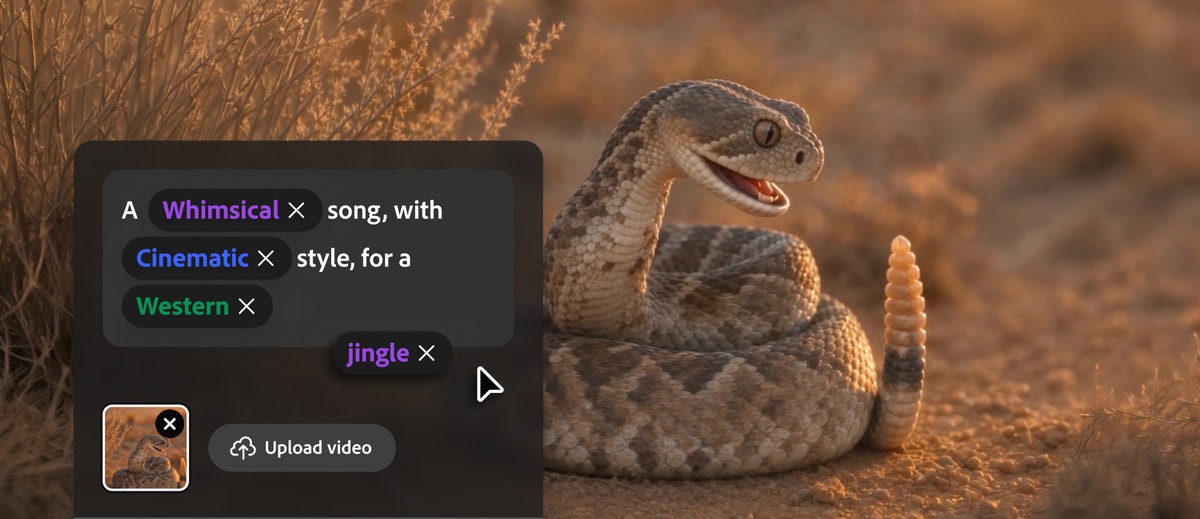
Firefly now generates music, voiceovers, and sound effects in one interface. For creative teams, the continuous path from draft to finished clip is the most interesting part.
What this is about
Adobe Firefly is no longer only a tool for images and short videos. On August 20, 2026, Adobe made Generate Music, Generate Speech, and Generate Sound Effects generally available. Users can now create music, voiceovers, and sound effects in the same creative environment where they work on images, videos, storyboards, and drafts.
The practical appeal is less about one new generation feature and more about the shared workflow. Someone producing a product clip, training video, or social post no longer has to move between separate services for imagery, editing, music, narration, and sound effects. Firefly is available as a web application and on iOS and Android.
What Adobe Firefly actually does
Generate Music creates a track from instructions such as mood and target duration. Adobe describes the outputs as original, universally licensed tracks intended for commercial content. Generate Speech turns a script into a voiceover and provides controls for voice, pacing, and emotion. Users can choose Adobe's model or ElevenLabs for this task. Generate Sound Effects creates individual sounds intended to match the action, timing, and energy of a clip.
These audio tools sit beside Firefly features for images, video, vector graphics, mood boards, and storyboards. Results can then move into applications such as Photoshop, Premiere, or Adobe Express. Firefly also offers models from partners including Google, OpenAI, Kling AI, Luma AI, and Runway. The selected model therefore matters: capabilities, costs, terms, and the character of results may differ.
Why it matters
Sound is not a minor detail in short video. Music establishes pace and mood, an intelligible voice carries the message, and suitable effects make edits feel believable. The Berklee report “In Sync: Music and Video 2026,” produced with support from Adobe, describes how closely music is tied to the workflows of the video creators it surveyed. The report is useful, but Adobe's support means it should not be treated as a fully independent effectiveness test of Firefly.
For small creative teams, the consolidation can still be tangible. Fewer exports and service switches can mean fewer format problems, fewer scattered project versions, and a clearer record of generations. Licensing is another factor: Adobe positions its own Firefly models as commercially safe and says they are trained on licensed and public-domain content. That is a vendor commitment, not a blanket guarantee for every conceivable use. Users still need to review trademarks, personality rights, client materials, and local rules.
In plain language
Producing a video without a shared audio workspace is like cooking in three kitchens: the vegetables are here, the stove is elsewhere, and the spices are next door. Firefly puts those ingredients on one worktop. That saves walking, but the cook still has to check whether the taste, quantity, and ingredients fit the assignment.
A practical example
An employee creates a 45-second product clip for a new coffee grinder. She first builds six scenes as a storyboard, generates matching image and video elements, and sets the edit. She then generates a calm 45-second music track, turns a 95-word script into a voiceover, and adds three sounds: beans being poured, the grinder running, and a cup being placed on a table.
Before publication, she exports two versions and checks them on headphones and a phone speaker. She reviews pronunciation, volume, brand references, and licensing records. The sensible first test is therefore not a complete client film but a short internal clip with a clear checklist. This quickly shows whether pacing, voices, and exports fit the existing production process.
Scope and limits
First, generated audio remains error-prone. Narration may stress names incorrectly, music may feel inappropriate, and effects may be mistimed or physically implausible. Editorial and listening checks are necessary.
Second, generations consume credits. Adobe offers a free entry point with daily generations but directs heavier users to paid plans. Teams should measure how many attempts their own typical project needs before producing an acceptable result, rather than looking only at the entry price.
Third, the platform does not perform a complete rights review. Commercial safety for Adobe's models does not automatically protect against problematic prompts, impersonation, protected trademarks, or client material with unclear rights. Users of partner models must also check the terms that apply to each model. A privacy and contract review is sensible before uploading confidential source material.
SEO & GEO keywords
Adobe Firefly, Generate Music, Generate Speech, Generate Sound Effects, Firefly Audio Model, Firefly Music Model, Firefly Speech Model, ElevenLabs, AI audio, music generator, voice generator, creative tool
💡 In plain English
Adobe Firefly now creates music, voiceovers, and sound effects alongside images and video. This can reduce service switching for creative teams, but it does not replace quality, rights, or privacy checks.
Key Takeaways
- →Generate Music, Generate Speech, and Generate Sound Effects have been generally available since August 20, 2026.
- →The audio tools are embedded in Firefly workflows for images, video, storyboards, and editing.
- →Adobe offers its own models as well as selectable partner models, including ElevenLabs.
- →A free entry point is available, but heavier use depends on generation credits and plans.
- →Quality, rights, privacy, and the terms of the selected models still require review.
FAQ
What types of audio can Firefly generate?
Firefly can generate music, voiceovers, and individual sound effects. The tools connect with image, video, and storyboard features.
Can Adobe Firefly be used for free?
Adobe offers a free entry point with daily generations. Paid plans and generation credits apply to heavier use.
Can the generated audio be used commercially?
Adobe positions outputs from its own Firefly models as commercially safe. Users must still review trademarks, personality rights, client materials, and the terms of selected partner models.
What should a team test first?
A short internal clip with narration, music, and a few effects is a sensible start. The team should then document pronunciation, sound quality, exports, credit use, and rights.