
Premiere generates video and audio directly in the timeline
October 22, 2026
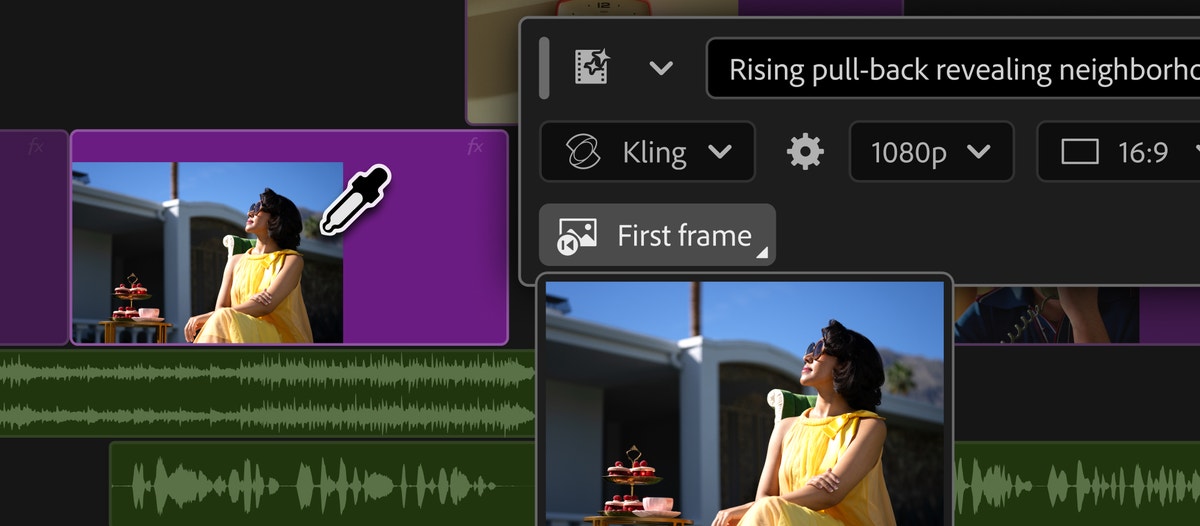
Adobe's Generative Media tool creates video, sound effects, soundscapes and music inside the edit. It reduces app switching, but every result still needs careful review.
What this is about
Adobe Premiere has offered a Generative Media tool since September 8, 2026 that creates missing video and audio inside the timeline. Editors no longer have to leave the application for every transition, sound effect or temporary music track. Adobe also announced new audio cleanup features and an assistant in After Effects. This review focuses on the usable Generative Media feature in Premiere.
Production teams may care because generated media does not sit in a separate demo beside the edit. It is created where it is needed and remains editable afterward. That changes the workflow more directly than adding another chatbot.
What Premiere actually does
The user selects a place in the timeline, opens Generative Media and describes the desired result. Premiere can use reference frames from the project so new footage better matches its surroundings. Adobe says users can choose Firefly as well as partner models from Google Veo, Kling, Runway and Luma.
Four functions are especially concrete. Generate Video fills visual gaps. Generate Sound Effects creates noises, and a spoken rhythmic cue can guide timing and intensity. Generate Soundscape, currently in beta, analyzes up to 15 seconds of video and builds an editable mix of ambience and effects. Generate Music, also in beta, creates several music variations with controls for tempo and looping. Adobe describes its own music as commercially safe and says synchronization rights cover different media types. Teams should still verify those claims for their contract and region.
Why it matters
In conventional editing, friction often comes from finding, importing and adapting supporting media rather than from making the cut itself. Generation inside the timeline can save time for rough cuts, transitions, mood tests and missing effects. The result already sits in the correct position and can be refined in the familiar project.
The practical value depends on the material. Synthetic replacement footage is risky for documentary evidence, news imagery or events presented as real. It is easier to place in fictional work, previsualization and clearly disclosed design. Premiere also remains a subscription product. Users should check current prices and feature limits on the official product page before testing because they can vary by region and plan.
In plain language
The workflow is like a kitchen where ingredients can be ordered directly at the stove. Previously, the cook had to leave the room, search the pantry and carry everything back. Now a suitable ingredient arrives at the workplace. The cook still decides whether it tastes right and belongs in the dish.
A practical example
An editor is cutting a 90 second product film. Three seconds of neutral footage are missing between two shots, and the scene also needs a quiet machine hum. She marks the gap, generates a short transition using neighboring reference frames and then creates a matching sound effect. Afterward, she checks visual errors, volume, trademark issues and disclosure of the synthetic material.
The first draft can therefore be built inside the same project. For the final version, she either replaces the generated visual with a real shot or deliberately documents that it remains synthetic. This review step separates a fast sketch from material ready for publication.
Scope and limits
First, generated images can contain temporal jumps, distorted details or unsuitable motion. Short clips need frame by frame review. Second, model choice and integration do not automatically settle rights. Prompts, references, identifiable people, trademarks and output rights require a separate check. Third, Generate Soundscape and Generate Music are labeled beta. Their behavior, availability and terms can change.
Privacy is another concern. Confidential source footage should only be uploaded when the contract, storage location and processing rules fit the project. For journalistic evidence, forensic material or recordings with a strict chain of custody, generative additions without clear provenance are unsuitable. The most sensible first test is therefore a non confidential internal project with one short visual gap and one sound effect.
SEO and GEO keywords
Adobe Premiere, Generative Media, Firefly, video editing, Generate Video, Generate Sound Effects, Generate Soundscape, Generate Music, After Effects, generative video, AI audio tool
💡 In plain English
Premiere can create missing short video and audio elements inside an editing project. That speeds up drafts, but it does not replace quality control or checks of rights, provenance and privacy.
Key Takeaways
- →Generative Media creates video and audio directly in the Premiere timeline.
- →Users can choose Firefly and several partner models.
- →Soundscape and music generation are labeled beta features.
- →Generated media remains editable but still needs careful review.
- →Confidential and documentary footage requires particular caution.
FAQ
What does Generative Media create in Premiere?
It can create short video clips, sound effects, soundscapes and music directly in the timeline.
Which models are available?
Adobe names Firefly and partner offerings from Google Veo, Kling, Runway and Luma. Actual availability may vary by plan and region.
Are all features generally released?
No. Adobe labeled Generate Soundscape and Generate Music as beta in its September 8, 2026 announcement.
Is it suitable for news footage?
Only with strong caution and clear disclosure. Synthetic media must not be presented as authentic documentary evidence.