
AEC Model Bridge lets AI assistants edit Revit models
October 9, 2026
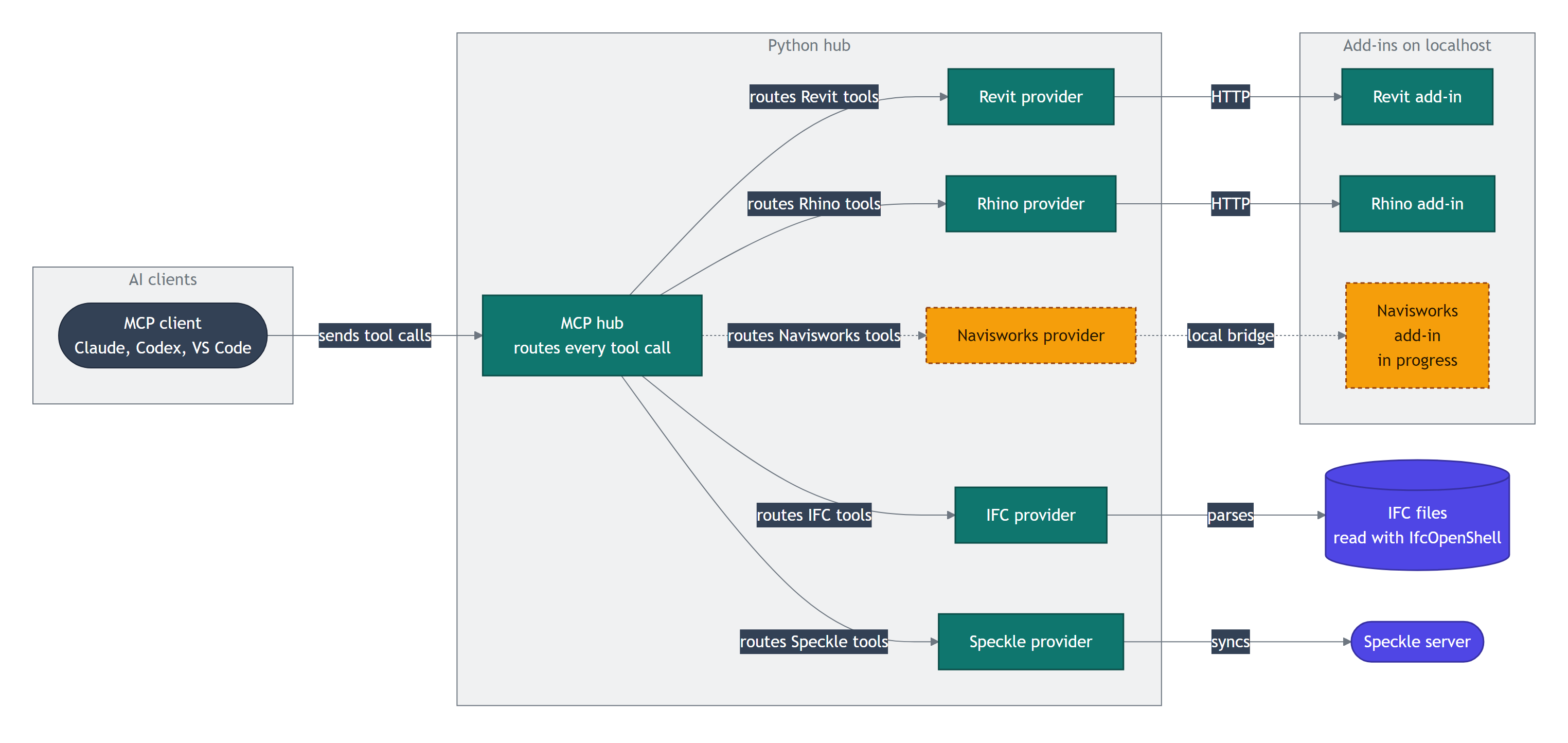
AEC Model Bridge connects Claude, Codex, and other MCP clients to Revit. Changes require visible approval by default before they reach the BIM model.
What this is about
AEC Model Bridge is an open MCP server that connects AI assistants to Autodesk Revit. Claude, Codex, and other MCP clients can read, inspect, and edit an open BIM model. The project combines a Python server with a native Revit add-in and was actively maintained on October 9, 2026.
The important feature is not merely its large tool catalog. Write operations pass through an approval gate by default. The assistant creates a plan, a person reviews it in a Revit side panel, and only after approval is the change executed as a named Revit transaction.
What AEC Model Bridge actually does
According to the current project documentation, the server exposes 219 tools, including 103 for Revit. They read elements, levels, views, families, and parameters or create walls, floors, roofs, rooms, dimensions, and schedules. Other providers connect IFC files, Rhino and Grasshopper, and Speckle. Navisworks support is explicitly still in progress.
Each tool carries MCP annotations that indicate whether it is read-only, modifies data, or reaches outside the local system. For a change, the approval gate pauses the call. After approval, the Revit add-in executes the plan in the main process. Rollback can use Revit Undo or stored inverse values. File outputs that cannot reasonably be reversed require a second confirmation.
A mock mode is available for evaluation. It runs without Revit, lists the tools, and returns fixed test responses without touching a real model. Live use requires Windows, Python 3.11 or later, and a licensed Revit version from 2024 through 2027.
Why it matters
BIM models contain many repeatable jobs: maintaining parameters, creating views, numbering sheets, starting exports, and checking quality rules. A natural-language interface can make these workflows more accessible when the result remains visible and reviewable.
AEC Model Bridge places control at a useful boundary. The assistant can formulate a plan, but the change remains blocked until a person approves it. This differs from unrestricted script execution, where an ambiguous request could immediately change many components.
The GPL license with a Revit linking exception allows source review. The project also offers a commercial license for other embedding scenarios. It is an independent project and is not affiliated with Autodesk.
In plain language
The tool works like a construction manager with a digital assistant. The assistant may write a work order listing exactly which doors, walls, or sheets should change. The manager reads and approves that order before work begins. An uncontrolled verbal instruction is not enough.
A practical example
A design team has a model with 480 rooms. A fire safety parameter is missing from 37 rooms. A team member first asks the assistant to inspect the model. The server reads the relevant parameters and creates a list. The next request is to set the value for exactly those 37 rooms.
AEC Model Bridge displays a plan containing the filter, target value, and element count. The team member compares five samples with the specification and approves the transaction. They then create a snapshot and inspect the difference. If the filter was wrong, they can roll back the change in the same session. The professional decision stays with the person; the tool handles selection and execution.
Scope and limits
First, approval only protects the model while it is enabled. The auto mode removes human review and belongs, at most, in tightly constrained test workflows.
Second, advanced tools such as invoke_method, reflect_get, reflect_set, and execute_python have the same permissions as the Revit process. They require a trusted client, a restricted workspace, and reviewable instructions.
Third, not every announced integration is complete. Navisworks remains in progress, Power BI is not registered in the central server, and other data formats are only planned. Live use also depends on a suitable Windows and Revit environment.
The best first test therefore uses mock mode. A copied test model with a few read-only queries should follow. A write task on a working model only makes sense after the approval, audit, and rollback workflow is understood.
SEO & GEO keywords
AEC Model Bridge, Revit MCP server, Autodesk Revit, BIM automation, Claude Revit, Codex Revit, Model Context Protocol, IFC inspection, human approval, Revit add-in, open BIM tools
💡 In plain English
AEC Model Bridge gives AI assistants tools for Revit and other BIM systems. Changes execute only after a visible plan and human approval by default.
Key Takeaways
- →The open MCP server connects Claude, Codex, and other clients to Revit.
- →Write operations require human approval by default.
- →A mock mode supports testing without Revit or a real model.
- →Live use supports Revit 2024 through 2027 on Windows.
- →Advanced scripting tools carry broad permissions and require extra care.
FAQ
Is AEC Model Bridge an Autodesk product?
No. It is an independent project and explicitly states that it is not affiliated with Autodesk.
Can I test it without Revit?
Yes. Mock mode lists the tools and returns fixed test responses without modifying a model.
Does every change require approval?
Yes in the default mode. The optional `auto` mode disables that control and should only be used in tightly constrained environments.
Which Revit versions are supported?
The documentation lists Revit 2024, 2025, 2026, and 2027 on Windows.