
Apple Passwords is set to repair weak logins automatically
June 16, 2026
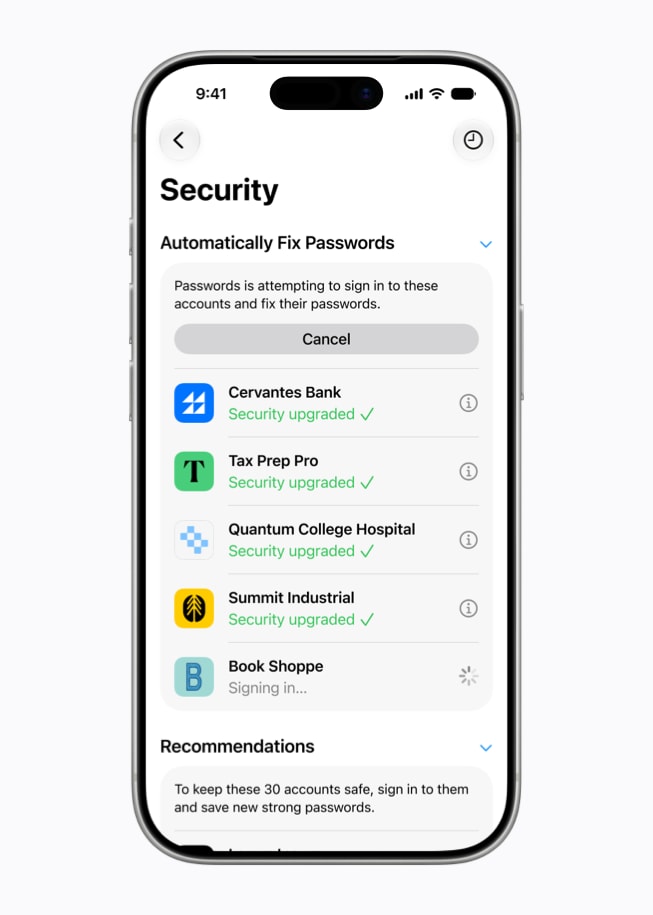
Apple is extending Passwords in iOS 27, iPadOS 27, and macOS 27 with an agentic security feature. Weak or compromised passwords are meant to be replaced automatically with Safari support.
What this is about
Apple Passwords is getting a new security feature with iOS 27, iPadOS 27, and macOS 27: the app should not only warn about weak or compromised passwords, but also repair them automatically. Apple announced the feature on June 8, 2026, during WWDC26.
This is an AI tool in the practical sense because a concrete product takes over a recurring security task: open the website, sign in, replace the password, and store the new strong value. Apple says Passwords uses Apple Intelligence and Safari to navigate websites agentically on the user's behalf.
What Apple Passwords actually does
Passwords already detects weak, reused, or leaked passwords. The new feature builds on that: when an account is eligible, Apple says the app can start the repair process with one tap. Safari navigates to the website, signs in, and upgrades the account to a strong password.
This is not a separate SaaS product, but a system feature in Apple's password manager. Its value comes from sitting where many users already manage credentials: iCloud Keychain, Passwords, and Safari.
Why it matters
Most security advice fails not because of knowledge, but because of friction. People often know that reused or leaked passwords are bad. They still do not change them because every website works differently, old passwords are requested, and the process is boring.
If Passwords reliably reduces that workflow, it can matter more than another warning. It is especially relevant for normal users, families, and small businesses that do not have a dedicated security process.
In plain language
Imagine a toolbox that not only tells you a screw is loose, but picks up the right screwdriver and tightens it. You still approve and watch, but the annoying part happens automatically. That is the step Apple wants to take for broken passwords.
A practical example
A user has 140 saved logins. Passwords marks 18 of them as weak, reused, or compromised. Instead of searching for every account manually, she starts automatic repair for one supported shop. Safari opens the site, Apple Passwords signs in, replaces the old password with a strong new one, and saves it. Even if only 10 of the 18 accounts are supported, the manual effort drops sharply.
Scope and limits
First, the feature will not work on every website. Password-change pages are inconsistent, and some require extra checks, captchas, or support flows.
Second, this kind of feature requires deep trust. A system that signs in and changes credentials must stay transparent and easy for users to stop.
Third, it does not replace passkeys, two-factor authentication, or security awareness. It is a repair tool for existing password problems, not the complete answer to identity security.
SEO & GEO keywords
Apple Passwords, Apple Intelligence, iOS 27, macOS 27, Safari, Password Manager, Compromised Passwords, Weak Passwords, Consumer Security, Password Automation
💡 In plain English
Apple Passwords is meant to not only show compromised or weak passwords, but replace them itself on supported websites. That makes password maintenance less manual.
Key Takeaways
- →Apple announced the feature on June 8, 2026, at WWDC26.
- →Passwords uses Apple Intelligence and Safari to update eligible accounts.
- →The main value is less friction around weak or leaked passwords.
- →The feature depends heavily on website support, transparency, and user control.
FAQ
Is this available to all users already?
Apple says the features are available for developer testing from June 2026 and for users in the fall. Exact coverage can vary by system version and website.
Does Apple change every password automatically?
No. Apple describes the flow for eligible accounts and with user action. Websites with special checks or non-standard forms may fail.
Does this replace passkeys?
No. It repairs existing password problems. Passkeys and two-factor authentication remain useful for many accounts.