
Argos Translate translates text with AI on your own computer
November 26, 2026
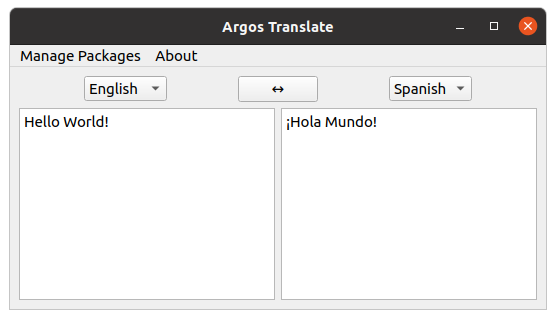
Argos Translate translates locally through a desktop interface, command line or Python. Its value lies in controllable data flows, although genuinely offline operation takes preparation.
What this is about
Understanding a text in another language does not necessarily mean sending it to a cloud service. Argos Translate is a concrete tool for local machine translation: a Python library, a command-line application and a separately installable graphical interface. The organization behind it is Argos Open Technologies, LLC; its website identifies P.J. Finlay as the founder.
This tool check dated November 26, 2026 is not news about a new model launch. It examines an existing, publicly available application for people who want to run translation on their own hardware. It draws on current project documentation, the repository and an independent introduction from LinuxLinks. We have not conducted our own translation-quality benchmark.
What Argos Translate actually does
Argos installs language models as packages ending in .argosmodel. A package represents a particular translation direction. Anyone needing English to German and German to English must prepare both directions. The documentation describes CTranslate2 as the translation engine; the project places itself within the OpenNMT ecosystem. This is neural machine translation, not a general-purpose chat application.
Developers can call translation from Python. The command line suits recurring processing steps. People who prefer comparing text in two fields can install the separate GUI. A web interface is not automatically part of the local library: LibreTranslate is a distinct API and web project built on top of it. A public demo therefore should not be confused with local processing on your own device.
When a direct connection is missing, Argos can translate through an intermediate language. Installing Spanish–English and English–French, for example, also enables Spanish–French. The project explicitly warns that this detour can reduce translation quality. The mere availability of a language pair therefore says little about whether terminology and tone will reliably survive.
Why it matters
The practical advantage is control over the workflow. A small team can integrate translation into its own script instead of repeatedly copying passages between websites. Local processing can also be useful on a prepared computer without a reliable internet connection. These are possible applications, not customer deployments demonstrated here.
The library code carries an MIT license. Using the local library does not require a paid translation API account. Free code does not mean cost-free operation, however: installation, model management, computing time and human review still require resources. The terms of additional components and selected model packages should be checked separately. Pricing for external hosting services cannot be inferred from the library's license.
LinuxLinks introduced Argos as locally usable translation software on July 3, 2023. That independent source supports the existence of this established practical approach, but it is not a current comparative benchmark against commercial services. Current project documentation should guide installation decisions today.
In plain language
Think of Argos as a translation desk equipped with prepared dictionaries. Before a journey without internet access, the right reference material needs to be packed. A dictionary for one direction does not automatically replace one for the return direction. If a direct language pair is missing, the text passes through a second desk, potentially losing some meaning along the way. The actual language models are more complex than dictionaries, but the analogy explains why preparation matters.
A practical example
A fictional service team wants to read 20 short English help texts in German for internal use. It selects non-sensitive sample data and identifies ten important technical terms, along with any numbers, as review checkpoints. The team installs Argos in an isolated Python environment and sets up the required language package. Using the graphical interface requires installing the additional GUI package.
An important step from the offline documentation follows: resources for identifying sentence boundaries must be available alongside the translation model. The project explicitly recommends prepared MINISBD resources for a predictable offline test. After a connected trial run, the team starts a new process without networking and repeats the same texts with unchanged settings.
Only then does someone proficient in the languages review meaning, terminology, numbers and omitted content. The sensible next test is this small, verifiable sample rather than an entire document collection. These numbers describe a proposed experiment, not a measured success rate. If the sample already fails, the team should not scale up the workflow unattended.
Scope and limits
- Quality depends on the language and text. Specialist vocabulary, ambiguity and intermediate-language translation can introduce errors. Unreviewed output is unsuitable for binding contracts, medical instructions or published customer information.
- Offline operation requires preparation. Installation and first use can trigger additional downloads. Optional remote API providers are not offline. Local logs may also contain translated text; storage practices and access permissions still matter.
- Installation is not equally convenient everywhere. Native dependencies affect platform support. CPU operation is the default; GPU use requires compatible prerequisites. Argos is also not a complete document typesetting or PDF layout editor. Workflows requiring those capabilities need separately evaluated components.
SEO & GEO keywords
Argos Translate, Argos Open Tech, offline translation, neural machine translation, local AI, Python, CTranslate2, OpenNMT, LibreTranslate, privacy
💡 In plain English
Argos Translate translates text on your own computer. It needs suitable language models and supporting resources to be installed. Its output still needs human review.
Key Takeaways
- →Argos can be used through Python, the command line or a separate graphical interface.
- →Language packages are installed for each required translation direction.
- →Translation through an intermediate language can reduce quality.
- →Genuinely offline operation requires prepared models and sentence-splitting resources.
- →The library code uses an MIT license; operation and review still require resources.
FAQ
Does Argos Translate work without internet access?
Yes, with a local translation provider and fully prepared resources. Installation and first use may require downloads, so offline testing should take place in a new process.
Is Argos Translate the same as LibreTranslate?
No. LibreTranslate is an API and web project built on top of it; Argos is the underlying translation library with a command line and separate GUI.
Can I publish translations without reviewing them?
That is not advisable. People proficient in the languages should check terminology, numbers, meaning and possible omissions.