
Axiom.ai builds browser workflows from simple instructions
October 27, 2026
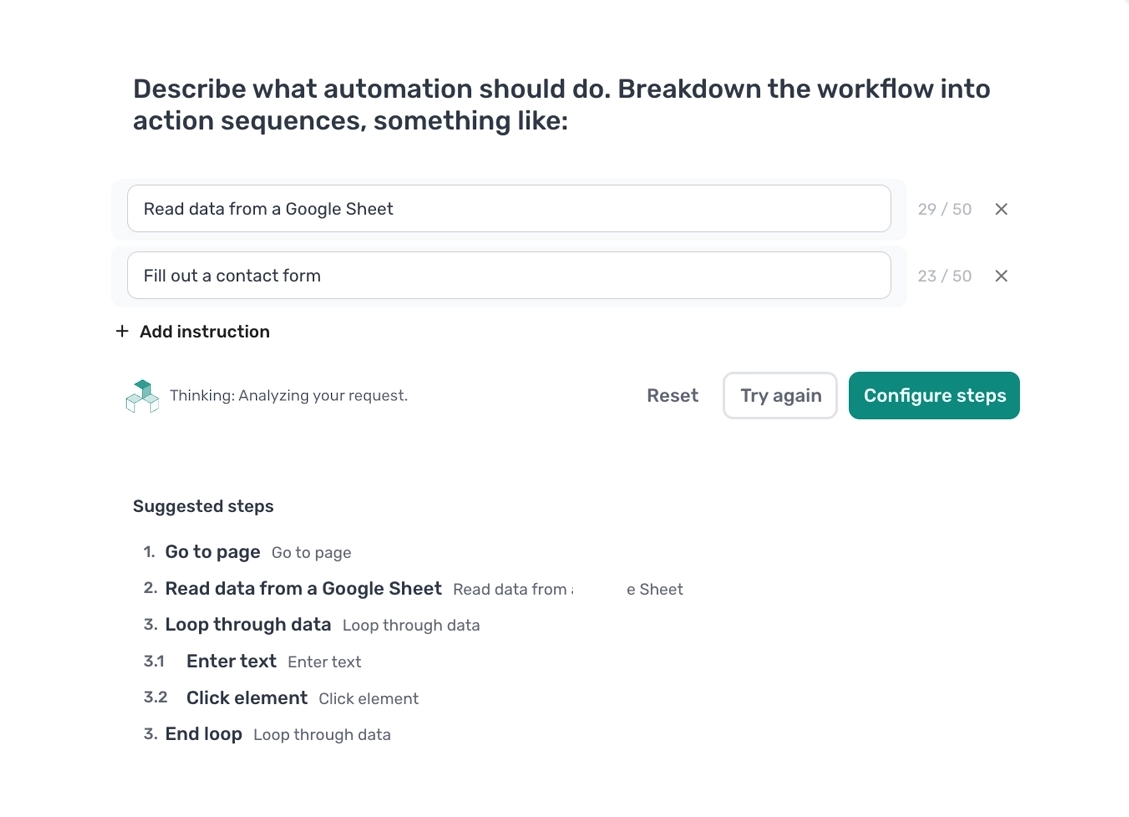
Axiom.ai uses AI to create editable browser workflows for forms, spreadsheets, and reports. This tool check explains its value, plan limits, and data flows in desktop and cloud runs.
What this is about
Axiom.ai turns descriptions of browser tasks into workflows that users can inspect and edit. The tool from Axiom AI Limited combines a Chrome extension with a visual builder, AI assistance, and execution on a local computer or in the cloud. It is relevant to people who regularly transfer information from websites, fill in forms, or assemble reports without wanting to write a script every time.
This tool check describes the publicly documented feature set on October 27, 2026, not a release announced today. Product pages, pricing, and the privacy policy were checked; we did not conduct a hands-on test of the extension. The provider can be identified through its UK company registration number, 11171985.
What Axiom.ai actually does
With Build by description, users describe a task as individual steps. The documentation recommends simple English instructions, with each line corresponding to one action. AI assembles a bot and guides configuration: selecting a page element, entering text, or specifying a data source, for example. An observed test run follows, with scheduling as a possible next step.
The result is not merely a chat response but an editable sequence of actions. Axiom lists extracting website data, transferring spreadsheet rows into forms, and recurring reports as use cases. According to the provider, the built-in assistant can also help extend workflows and troubleshoot them. An instruction that sounds clear does not, however, guarantee a correct workflow.
For more technical teams, there are also APIs and an MCP server in the desktop application. Compatible AI clients can use these to trigger and work with automations. Access depends on the subscription: the current pricing table lists the desktop MCP server from the Pro tier onward. A first experiment with the visual builder does not require configuring this additional integration layer.
Why it matters
The practical value sits between repetitive manual clicking and custom-built browser automation. A small operations team can initially describe a recurring process itself, inspect the proposed steps, and correct individual errors. This is particularly worth considering when a required application lacks a suitable direct integration in the team's existing toolkit.
Axiom lists integrations including Google Sheets, Excel, Zapier, Make, and n8n. Teams should establish which connections they actually need before choosing a plan. If a reliable direct interface already handles the same task, adding browser interaction may be unnecessary: the visible interface is another place where changes can affect a workflow.
According to the pricing page, new accounts receive two free runtime hours without a credit card. At the time of checking, Starter costs US$15 per month for five runtime hours, while Pro costs US$50 for 30 hours. Trial runtime does not renew. The table specifies an API key for LLM integrations. Potential model charges should therefore be checked separately rather than treating the Axiom subscription as the entire AI budget.
In plain language
Think of Axiom as someone turning spoken cooking instructions into a recipe card with checkboxes. Instead of simply saying “make dinner,” the card says “get the ingredients,” “chop the vegetables,” and “heat the pan.” Before using the recipe regularly, you check the order and clarify any ambiguous quantities. Here, AI similarly creates the work instructions; the user checks that they fit the actual website.
A practical example
A fictional events office needs to transfer 20 approved events from a spreadsheet into its own administration form each week. To start, the person responsible uses only three invented events and a test form. They describe opening the page, reading a spreadsheet row, entering the fields, and moving to the next record as separate steps.
Next, they check how the date, title, and location are mapped and observe a complete run. An event with an empty location field reveals whether the workflow stops cleanly or enters incorrect information. Only after the results are correct does the team consider more records and a schedule. This is a suggested test setup, not a measured performance result. Correct entries, visible failures, and actual runtime consumption matter more than an estimated time saving.
Scope and limits
- Websites and AI suggestions can introduce errors. Changed forms, expired sessions, or incorrectly selected elements can stop a workflow or populate the wrong fields. An initial run involving irreversible actions should not be unattended; start with test data and controlled write access instead.
- Desktop execution does not automatically mean a fully local AI data flow. According to the privacy policy, session data remains local for desktop runs but is sent to execution servers for cloud runs. Axiom stores information including account details and automation configurations and states that it does not use user data to train models. Connected model providers and integrations still need separate review. These are provider statements, not an independent privacy audit.
- Subscriptions and permissions are part of the tool. Runtime allowances, scheduling, APIs, and cloud limits differ by plan. The terms grant a limited usage license, not an open-source license. Teams requiring fully self-hosted infrastructure or guaranteed suitability for sensitive processes should clarify those requirements before adoption.
The sensible next step is therefore a small, observed test with invented data. Axiom is most interesting when it produces a workflow that is understandable and correctable, and that the team can subsequently maintain itself.
SEO & GEO keywords
Axiom.ai, Axiom AI Limited, browser automation, AI assistant, no-code, Chrome extension, web scraping, Google Sheets, MCP, desktop automation
💡 In plain English
Axiom.ai helps turn repetitive browser work into an editable workflow. AI proposes steps; users check them and test the result. Execution and costs depend on the selected plan and connected services.
Key Takeaways
- →AI creates editable workflows rather than just chat responses.
- →Browser tasks can run on the desktop or in the cloud.
- →Two free runtime hours provide a limited starting point without a credit card.
- →MCP, APIs, and scheduling depend on the plan; model costs require separate checking.
- →Local execution does not replace reviewing the data flows of connected AI services.
FAQ
Who is Axiom.ai useful for?
Teams with recurring browser tasks, such as transferring spreadsheet values into forms. It is particularly relevant when a suitable direct integration is missing.
Is Axiom.ai free?
According to the pricing page, new accounts receive two free runtime hours. Paid plans apply afterward; as of October 27, 2026, Starter costs US$15 per month for five runtime hours.
Does desktop execution keep all data on the computer?
According to the provider, session data stays local during desktop execution. This does not mean that connected AI services or integrations transmit no data.
Was the tool tested hands-on?
No. This article is based on live-checked product information, pricing, privacy terms, and the company register; the example scenario is fictional.