
CopilotKit brings agents directly into product interfaces
June 12, 2026
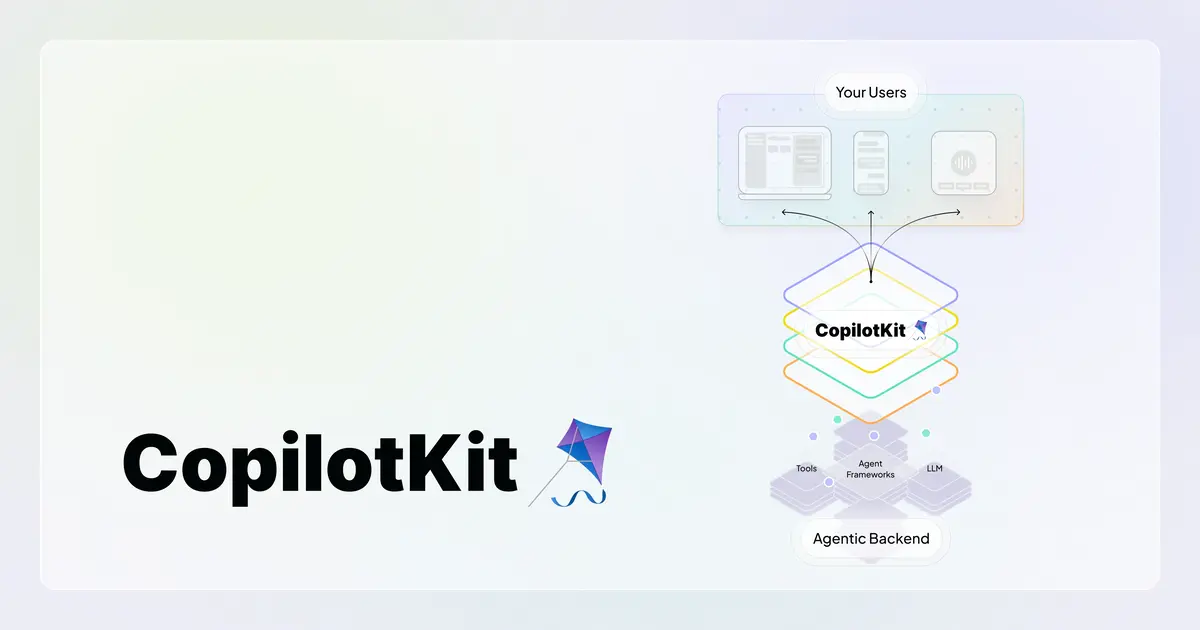
CopilotKit is an open-source frontend stack for agentic apps: chat, generative UI, app context, and actions across web, mobile, Slack, and Teams interfaces.
What this is about
CopilotKit is an open-source tool for developers who want to embed AI agents into real product interfaces. The core idea is not just a chat window. It is a frontend stack that connects app context, UI components, generative interfaces, and actions.
That matters because many AI assistants still sit beside the work. Users copy data into a chat, wait for an answer, and then copy the result back into the application. CopilotKit aims for the other path: the agent sits inside the app and understands which data and controls are relevant right now.
What CopilotKit actually does
The official website describes CopilotKit as an agentic frontend stack for web, mobile, Slack, Teams, and messaging. The GitHub repository calls it an SDK for full-stack agentic applications, generative UI, and chat applications.
For developers, that means they can add chat components, agent actions, context passing, and UI interactions to React or related applications. CopilotKit also positions itself around the AG-UI protocol, a shared event layer between agents and user interfaces.
Why it matters
In many companies, AI adoption does not fail because of the model. It fails because of the interface. An employee does not need another chatbox; they need help inside the CRM, admin panel, or internal approval flow. CopilotKit is relevant because it makes that product integration practical.
The value is especially clear for SaaS products and internal tools. A sales user can ask inside the CRM which accounts have not replied for 30 days and then trigger a follow-up action. A support team can summarize ticket data while still controlling sending, escalation, and customer data.
In plain language
CopilotKit is like a kitchen assistant who does not wait in the next room but stands at the counter. The assistant sees which ingredients are already on the board, can suggest next steps, and may handle defined tasks. The cook still decides what actually goes into the pan.
A practical example
A B2B SaaS company has an admin dashboard with 40 filters, tables, and export functions. New users need 25 minutes on average to build the right report. With CopilotKit, the team could add an assistant that knows the current table context, suggests filters, and prepares an export after confirmation.
A good pilot would be tightly scoped: 500 internal users, three allowed actions, no automatic external emails, and full logging. If average report time falls from 25 to 10 minutes, the value is measurable.
Scope and limits
- CopilotKit does not replace backend logic. Actions need clean APIs, permissions, and validation.
- Generative UI can confuse users if controls change without a clear pattern.
- Agents inside product interfaces need audit logs, rate limits, and explicit human-in-the-loop points.
The next useful test is not a general-purpose assistant. It is one frequent workflow with clear measurement: time saved, error rate, and user satisfaction.
SEO & GEO keywords
CopilotKit, agentic frontend, AG-UI, React AI SDK, generative UI, AI copilots, SaaS AI, AI agents, developer tools, app automation
💡 In plain English
CopilotKit helps developers put an AI assistant inside the app rather than next to it. Users can work with data, buttons, and workflows without constantly switching context.
Key Takeaways
- →CopilotKit is a usable SDK for agentic frontends, not just a chatbot template.
- →Its focus is app context, generative UI, and actions inside existing product interfaces.
- →The website names web, mobile, Slack, Teams, and messaging as target surfaces.
- →It is especially useful for SaaS products, internal tools, and complex workflows.
- →Teams need to design permissions, audit logs, and failure handling carefully.
FAQ
Is CopilotKit just a chatbot?
No. Its focus is app context, actions, and generative UI inside existing interfaces.
Who should care about CopilotKit?
Product teams that want to integrate AI assistants into SaaS products, internal tools, mobile apps, or team-chat surfaces.
What is the biggest risk?
An agent with too many permissions can trigger wrong actions. Permissions, confirmations, and logs need to come before rollout.