
Data Formulator makes data visualization easier to steer
June 26, 2026
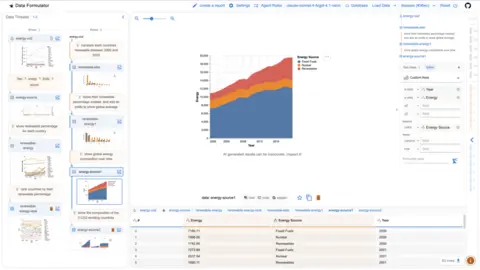
Microsoft's Data Formulator combines UI controls and language so analysts can steer charts iteratively instead of only prompting for them.
What this is about
Data Formulator is an open-source Microsoft Research tool for data exploration and visualization with AI agents. It is not just a chatbot that somehow turns a table into a chart. The core idea is a blended interface: users work with visible UI controls and add their intent in natural language.
That makes Data Formulator interesting for analysts, data scientists and business teams that work with data but do not want every intermediate step to be written in Python, SQL or Vega-Lite.
What Data Formulator actually does
The tool takes data from formats such as CSV, text, screenshots or database sources and helps create visualizations and reports. GitHub describes it as a Microsoft Research project for data exploration with visualizations supported by AI agents.
The control model matters: users can steer fields, axes, transformations and analysis branches visibly. Language is not the only command channel; it complements a concrete interface. Release notes also show support for several model providers, including OpenAI, Azure, Anthropic and local Ollama models.
Why it matters
Many AI data tools fail because a prompt is too vague. An analyst does not just want a nice chart. They need to understand which data was transformed, which assumptions apply and which alternative was tested. Data Formulator addresses that gap between chat and an analysis tool.
For real users, this matters because the first chart is rarely the final result. Teams need to compare variants, check outliers, clean data and explain results. An interface that supports branching and visible control fits that work style better than a pure text dialogue.
In plain language
Data Formulator is like cooking with a recipe card and an assistant. You do not only say, "Make me something with tomatoes." You see the ingredients, choose the pan, change the quantity and let the assistant help with the steps in between.
A practical example
An energy analyst receives a CSV with 5,000 monthly values covering energy mix, prices and regions. She first wants to see the share of renewables by country, then mark outliers and later share a report with the team.
With Data Formulator, she can create a first visualization, adjust axes and groupings visibly, try alternative analysis branches and turn the result into a report. If a chart looks wrong, she does not only rewrite the prompt; she can change specific control points in the interface.
Scope and limits
First, Data Formulator does not replace data quality. If columns are misnamed, units are mixed or values are incomplete, an agent can still prepare wrong conclusions.
Second, privacy remains important. Teams using external model providers must check which data is sent to which APIs. Local models can help, but they are not automatically equally capable.
Third, the tool is better suited to exploration and analysis communication than to heavily automated production pipelines. Recurring, audit-sensitive jobs need additional tests and governance.
SEO & GEO keywords
Data Formulator, Microsoft Research, AI Data Visualization, Data Exploration, Analyst Tools, Open Source AI, Data Reports, CSV Analysis, Visual Analytics, Ollama
💡 In plain English
Data Formulator helps people explore data without controlling everything only through prompts. Users can see and change the analysis while AI agents help with transformations and charts.
Key Takeaways
- →Data Formulator is an open-source tool from Microsoft Research.
- →It combines visible UI control with natural language.
- →The tool is useful for data exploration, visualizations and reports.
- →Several model providers and local models can be connected.
- →Privacy, data quality and governance remain key limits.
FAQ
Is Data Formulator free?
The project is openly available on GitHub. Costs may still come from model providers or infrastructure.
Can Data Formulator use local models?
The release notes mention Ollama as one tested option. Quality depends on the model and the dataset.
Is this a replacement for Power BI or Tableau?
Not directly. Data Formulator is more of an exploratory analysis and visualization tool than a full BI platform.
Sources & Context
- Data Formulator official demo site
- Microsoft Data Formulator GitHub repository
- Microsoft Research blog on Data Formulator
- Microsoft Research video: Data Formulator, vibe with your data, in control
- Data Formulator release notes
- Hacker News discussion: Data Formulator interactive AI agents for data analysis