
DBX connects database work to AI agents with clear permissions
August 20, 2026
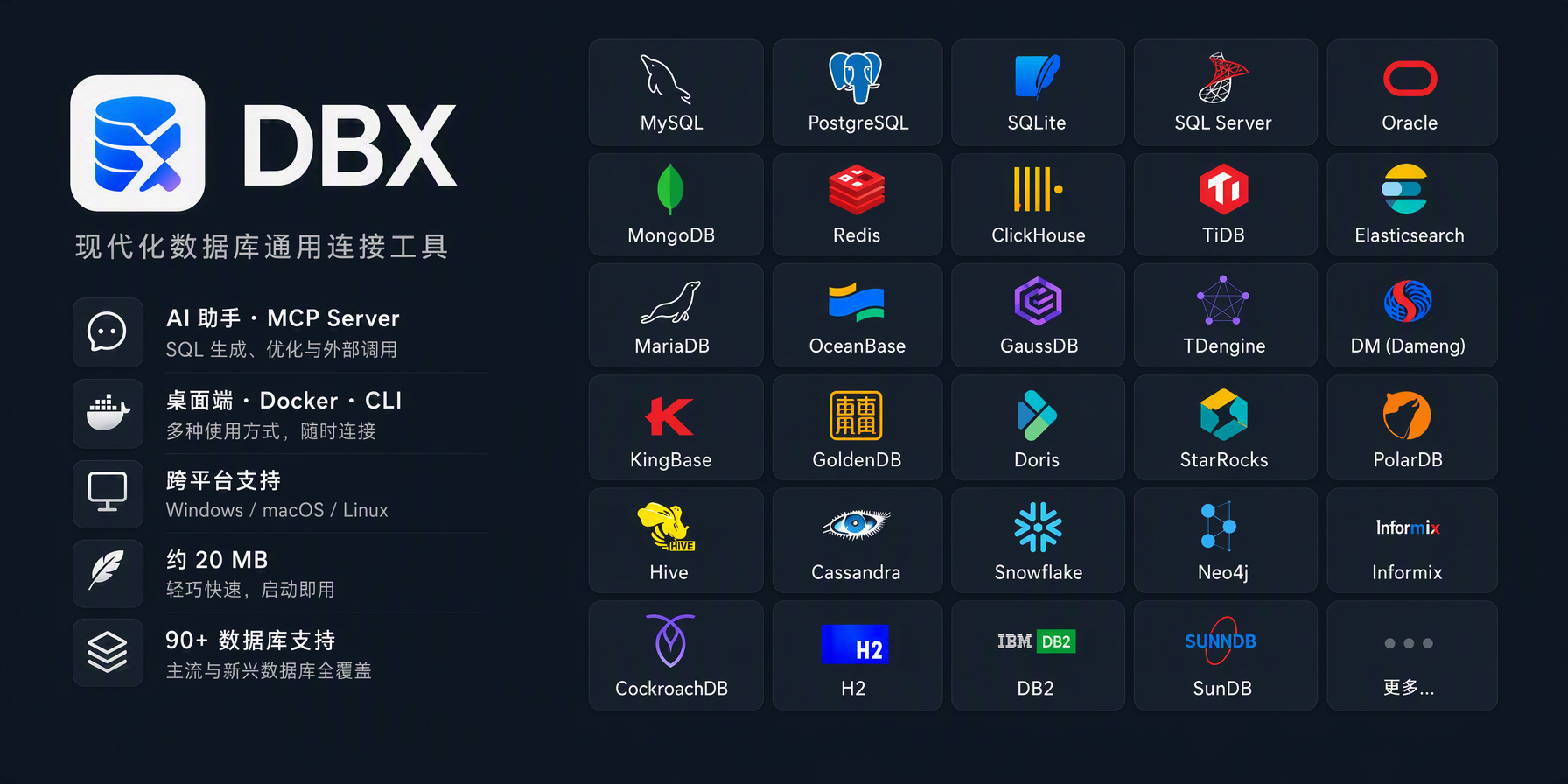
DBX combines more than 90 databases, a SQL assistant, and an MCP server. Its key feature is separate permission control for read and write access by AI agents.
What this is about
DBX is an open-source, cross-platform database client with a desktop app, web and Docker operation, a command line, a built-in SQL assistant, and a separate MCP server. The project claims support for more than 90 database systems and an application size of roughly 20 MB. It is developed under Apache 2.0 and was actively maintained on August 20, 2026.
The interesting part is not only the long driver list. DBX connects existing database connections to AI clients such as coding agents and separates three access levels: read only, data read/write, and full access. This turns a traditional database interface into a controllable gateway for agents.
What DBX actually does
The desktop application combines a query editor, schema browser, result grid, ER diagrams, execution plans, data comparison, import, and export. Its built-in assistant can create SQL from natural language, explain queries, or suggest fixes and optimizations. According to the project documentation, users can connect Claude, OpenAI, local models through Ollama, and OpenAI-compatible endpoints.
The separately distributed MCP server exposes existing DBX connections to compatible agents. Administrators select an allowlist of connections and an access level. The read_only mode is intended to prevent changes, safe_write permits limited data changes, and high_risk_write grants broader access. A saved central policy cannot be weakened by a legacy environment variable. That is more important than merely having an MCP checkbox: permissions remain visible and manageable at the data source.
DBX documentation lists PostgreSQL, MySQL, SQLite, Redis, MongoDB, DuckDB, ClickHouse, SQL Server, and Oracle among its supported systems. Some systems use native support, while others rely on agent-based or JDBC profiles. Features therefore may not be identical across every system.
Why it matters
Many teams copy schema extracts or query results into a chat so a model can formulate SQL. Data then leaves its original work context, permissions become difficult to trace, and the generated query must be copied back. DBX keeps drafting, review, and execution closer together.
For developers, data analysts, and small platform teams, the combination of a graphical interface and MCP server is the main attraction. An agent can inspect metadata or prepare a query while a person reviews the result and execution plan in the same application. The Apache 2.0 license and Docker option make an internal evaluation easier. The real benefit, however, depends on whether a team properly separates connections, secrets, and write permissions.
In plain language
DBX is like a workshop with a shared tool cabinet. The desktop app is the workbench, the SQL assistant helps select a tool, and MCP is the door for an outside helper. The critical choice is whether that helper may only look, use selected tools, or open the entire cabinet.
A practical example
A SaaS team runs PostgreSQL for customer data and ClickHouse for events. A developer wants to understand why 18 out of 10,000 daily imports fail. She configures both connections in DBX, gives the coding agent read-only MCP access, and asks it to inspect tables and columns.
The agent proposes a query grouping error codes by import version. The developer reviews the SQL and execution plan, limits the period to seven days, and runs the query herself. Only after confirming the finding does the team prepare a separately reviewed patch. The agent required neither unrestricted production write access nor manual copying of production data into a web chat.
Scope and limits
First, an MCP connection remains an additional attack path. Incorrectly selected connections or write permissions can modify data; production access should use separate database accounts with minimal privileges. Second, AI-generated queries are not automatically correct or efficient. Poor joins can create significant load and cost on large tables. Third, feature coverage varies by database driver, and claims about size and database count come from the project itself.
In regulated environments, DBX does not replace access management, auditing, secret storage, or approval workflows. The sensible next test is deliberately small: connect a local or masked test database, enforce read_only, try five common analysis questions, and inspect what information appears in agent logs.
SEO & GEO keywords
DBX, database client, MCP server, SQL assistant, PostgreSQL, database agent, Ollama, self-hosting, Apache 2.0, database permissions, developer tool
💡 In plain English
DBX is a database application with built-in AI help and an interface for agents. Teams can decide which database an agent may access and whether it can only read or also write.
Key Takeaways
- →DBX combines a database interface, SQL assistant, and separate MCP server.
- →The project claims support for more than 90 database systems.
- →Three permission levels separate read-only access from agent write privileges.
- →The documentation lists Claude, OpenAI, Ollama, and compatible endpoints.
- →Production use still requires least-privilege database accounts, auditing, and human review.
FAQ
Is DBX open source?
Yes. Its repository is licensed under Apache 2.0.
Can DBX use local models?
According to the project documentation, the SQL assistant supports local models through Ollama and OpenAI-compatible endpoints.
Can an MCP agent change data automatically?
Only if a write permission level has been granted. A separate read-only database account is a sensible starting point.
Does DBX replace database auditing?
No. Logging, secret management, roles, and approvals remain the operator's responsibility.