
ESP32 iPhone Agent lets AI control a real iPhone
October 20, 2026
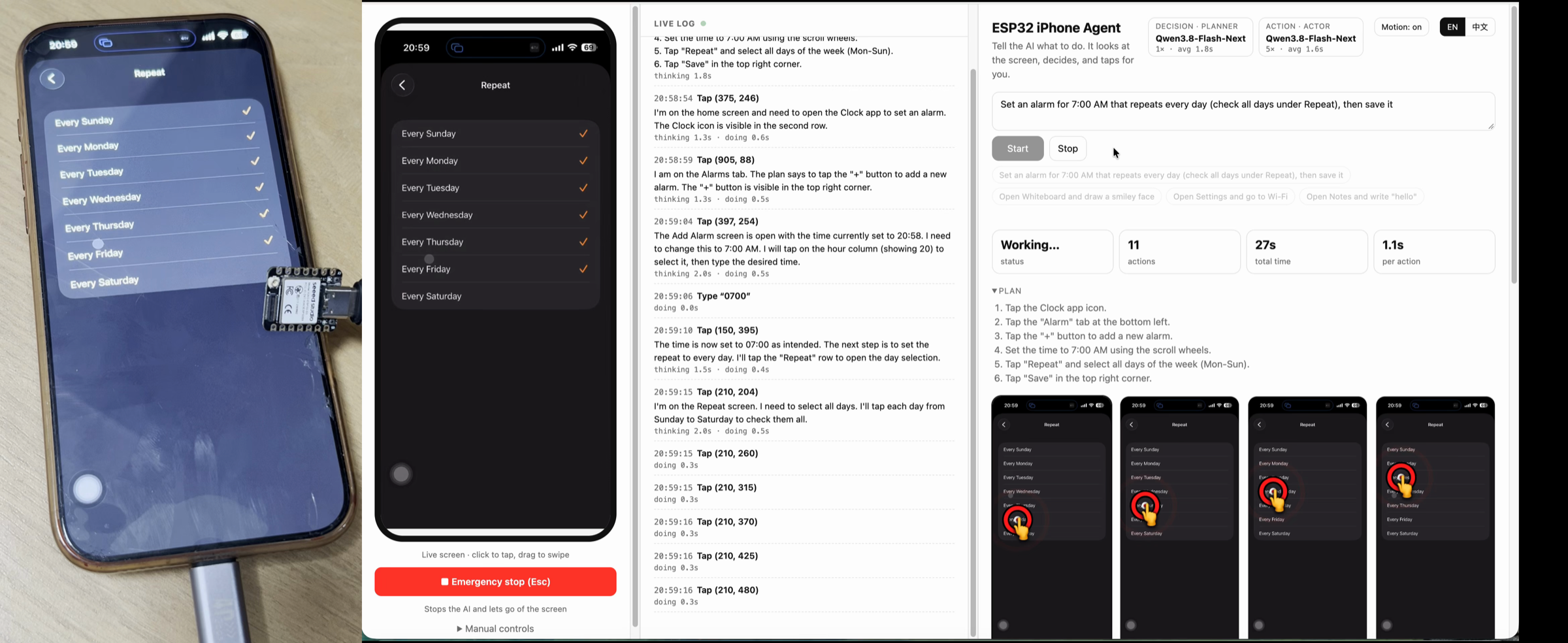
An open project combines screen mirroring, an inexpensive ESP32 and a vision model. This lets an AI agent operate a real iPhone without requiring a Mac during use.
What this is about
ESP32 iPhone Agent is an open source tool that gives an AI model eyes and hands for a real iPhone. The project uses an ESP32 S3 as both an AirPlay receiver and a USB mouse and keyboard. An app on the same iPhone processes a reduced screen image, asks a compatible vision model for the next action, and sends clicks, swipes or text input back to the board over Bluetooth.
The approach is particularly notable in October 2026 because the current version no longer needs a computer during operation. A Mac with Xcode is still required once to build and install the app and flash the board. After that, the phone and board operate as a self contained pair.
What ESP32 iPhone Agent actually does
The iPhone mirrors its screen to the ESP32 S3 through AirPlay. The board does not decode the video stream itself. It forwards compressed images over Bluetooth to the iPhone app. There, a selected vision model behind an OpenAI compatible interface evaluates the current state. A planner breaks down the goal, while an actor selects the next interface action.
The board also presents itself as an ordinary USB mouse and keyboard. With Apple's AssistiveTouch accessibility feature, the mouse pointer becomes a substitute for a finger. The system can tap, drag, type, press keys and return home. After every action it waits for the screen to settle and checks whether anything changed. If the pointer loses its position, the app locates it again and corrects the offset. Every run remains on the device and can be replayed with actions drawn over the screenshots or exported as a trace.
Why it matters
Mobile automation often depends on developer tools, a tethered computer or a dedicated test environment. This project demonstrates a different route: it works through the visible interface of a real device while using standardized USB input. That can be useful to developers, quality testers and researchers who want to study interface workflows on physical hardware.
The source code is available on GitHub. The app uses SwiftUI, while the firmware relies on Arduino components. The project specifies iOS 18 or newer and an ESP32 S3 board with native USB and PSRAM. It supports vision models exposed through an OpenAI compatible interface, including privately hosted servers. According to the project documentation, credentials are stored in the iOS Keychain.
In plain language
Think of the system as a helper standing outside a shop window. Screen mirroring is the view through the glass. The board is a mechanical hand operating a mouse and keyboard. After each look, the vision model decides which movement should come next. The helper does not automatically understand every app or the intent behind an unexpected dialog, so a person should be able to watch and intervene.
A practical example
A tester wants to check whether a reminder app correctly saves a recurring event on five real iPhones. The tester provides the goal: “Create a reminder for 8 a.m. every Monday and Tuesday, then save it.” The agent opens the app, sets the time and weekdays, and saves the entry. The tester then exports the screenshots and actions from every run.
This can make repetitive checks easier, but it does not replace deterministic test logic. If a dialog appears in a different location, the model mistakes one button for another or the cellular connection fails, the run must stop for review. Unattended use would be inappropriate on accounts with real payments, confidential messages or administrative privileges.
Scope and limits
First, the project reports Bluetooth throughput of roughly 300 to 500 kilobits per second. The mirrored image is reduced to 480 by 1040 pixels at no more than five frames per second. Individual steps therefore take several seconds.
Second, iOS does not mirror sensitive screens such as passcode entry, Apple Pay and protected video. Mirroring stops when the phone locks. Landscape apps and non ASCII text input are still listed as unfinished work in the current roadmap.
Third, installation is not a finished App Store flow. A Mac with Xcode is initially required, free signing must be renewed regularly, and the app currently uses a private iOS interface to move itself into the background. Users should automate only devices and accounts they own or are authorized to use, supervise runs, and review the cost and privacy terms of the selected vision model.
SEO and GEO keywords
ESP32 iPhone Agent, iPhone automation, mobile AI agent, ESP32 S3, AirPlay, AssistiveTouch, USB HID, vision model, iOS test automation, open source AI
💡 In plain English
ESP32 iPhone Agent lets a vision model see a real iPhone interface and operate it through a small USB board. The project is open source, but it requires technical setup and should be supervised.
Key Takeaways
- →The tool combines AirPlay screen mirroring with USB mouse and keyboard input through an ESP32 S3.
- →After setup, no Mac is required during operation.
- →An OpenAI compatible interface supports cloud services or privately hosted vision models.
- →Every run can be replayed on the iPhone and exported as a trace.
- →Protected screens, landscape mode and non ASCII text input limit current use.
FAQ
Does the tool always require a Mac?
No. A Mac with Xcode is needed for initial setup, but the project says it is not required for later operation.
Can it work without a cloud model?
Yes, if a privately hosted server provides a compatible OpenAI style vision interface. The phone must still be able to reach that server.
Can the agent operate every iPhone screen?
No. iOS does not mirror passcode entry, Apple Pay or protected video, among other screens. Landscape mode is also unsupported today.
Is unattended use appropriate?
Not for sensitive accounts. A vision model can misread controls, so a person should monitor the run and be able to stop it.