
InvokeAI combines local AI images with targeted canvas editing
November 9, 2026
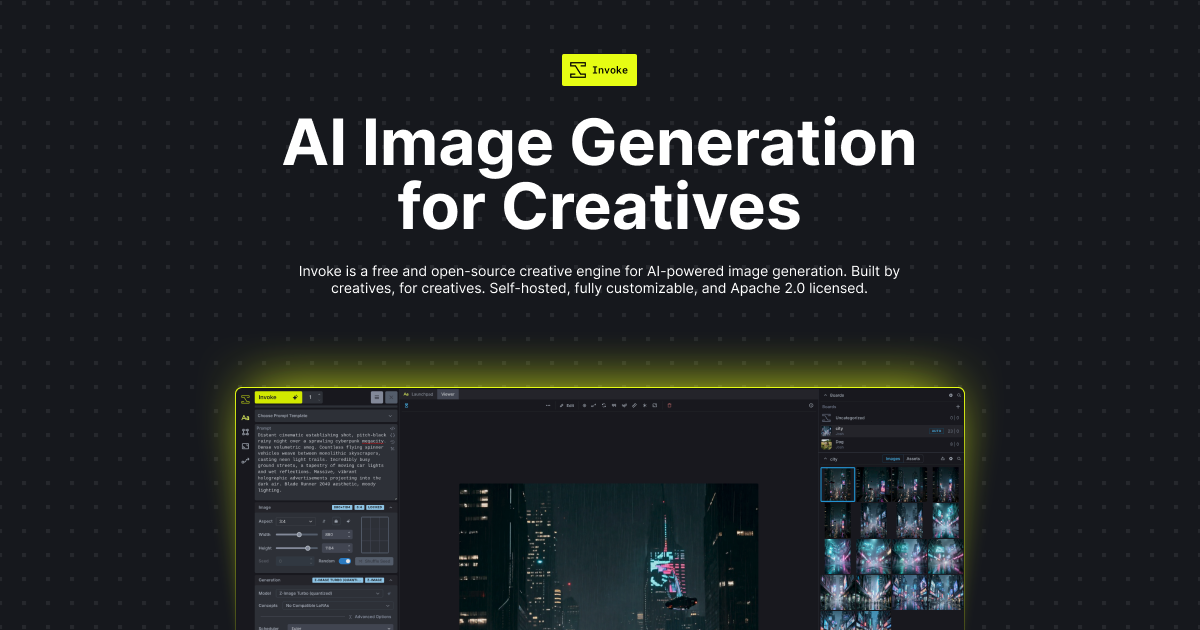
InvokeAI generates and edits images on a shared canvas. The open-source tool can be self-hosted; external image models introduce separate costs and privacy considerations.
What this is about
InvokeAI, also called Invoke in its interface, is a usable tool for AI image generation and editing. It combines a layered canvas, model management and reusable workflows. This is relevant to people who want not only to generate a draft from text, but also to change specific areas afterwards. This tool check describes publicly documented capabilities as of November 9, 2026; it is not our own performance test.
Availability requires a careful distinction. According to the official website, the former hosted Invoke.ai platform was shut down after the founding team joined Adobe. The open-source project continues. The website names Lincoln Stein and Vic, known as Blessedcoolant, as its ongoing stewards. Anyone starting now should therefore use the current installation instructions rather than plan around an old hosting offer.
What InvokeAI actually does
Invoke runs a locally hosted web server with a browser interface. Users can generate, collect and edit images there. The Unified Canvas supports brushes as well as inpainting and outpainting: a marked area is regenerated, or an image is extended beyond its existing boundaries. This differs from requesting an entirely new composition every time a correction is needed.
There is also a visual editor for workflows made from connected building blocks. Experienced users can assemble recurring processing steps with it. The gallery stores images and provides access to associated information such as prompts and settings. A model manager helps organize suitable models and supplementary components. The capabilities actually available depend on the selected model and the installed version.
The external model documentation also describes connections to third-party image APIs. These appear alongside local models in the selection menu. In that case, however, the provider performs the computation, and charges go through the user's provider account. The documentation names an important limitation: external providers currently do not support inpainting there. A shared interface therefore does not mean every model can perform the same editing steps.
Why it matters
The practical value lies in combining generation with targeted revision. For illustrators, small design teams or people working on their own visual drafts, replacing a background while retaining other areas may be more useful than repeatedly generating complete images. This is an editorial assessment of the workflow, not a measured time saving.
The project uses Apache 2.0. The software itself therefore requires no mandatory subscription fee; hardware, electricity, storage and potentially external computing remain cost factors. The application's license does not replace the conditions of individual models. External GPU provider Runpod also describes running Invoke in its own tutorial. This documents another deployment option, but it is commercial provider material rather than an independent quality test.
In plain language
Think of Invoke as a drawing table with tracing paper. One sheet holds the background, another a correction. Instead of throwing away the entire drawing, you work on the relevant area. The AI supplies new image pieces; a person decides whether they fit the rest of the draft. Visible layers help organize the work, but they do not guarantee an accurate depiction.
A practical example
A fictional design team wants to try three background variations for a product it has photographed itself. It starts with a non-sensitive test photograph, checks the hardware requirements and installs Invoke through the official launcher. It then selects a locally runnable model whose conditions fit the intended use. The numbers in this example form a test plan, not vendor performance claims.
The team marks the background and generates three variations. It then inspects product edges, shadows and transitions at a magnified view. If the AI alters parts of the product, the variation is discarded or revised. The usable draft and its settings are saved so that subsequent changes remain traceable.
The next useful test is small: edit the same marked area using two different instructions and record the correction effort. What matters is not only whether an image looks appealing, but whether the desired change can be achieved with control. Before using confidential client images, the team should ensure that a local model really is selected and that no external API is involved.
Scope and limits
- Hardware and operation: Local image generation requires suitable hardware and storage. The official instructions explicitly refer to model-dependent system requirements. Self-hosting also means organizing updates and backups yourself; it does not establish a general speed guarantee.
- Costs and privacy: A local browser interface does not make external models local. API use forwards requests to the provider, making its prices, data handling and usage limits relevant. Anyone wanting exclusively local operation must check model selection and configuration accordingly.
- Image quality and rights: Generated details, product shapes or transitions can be incorrect. The software license settles neither all model conditions nor rights to uploaded subjects. Human review is essential for authoritative product depictions or sensitive originals.
SEO & GEO keywords
InvokeAI, Invoke, AI image editing, Unified Canvas, inpainting, outpainting, local AI, open source, Apache 2.0, image models
💡 In plain English
InvokeAI generates images and helps edit specific areas. It can run on your own hardware. Selecting external image models instead uses the services of the respective provider.
Key Takeaways
- →InvokeAI combines image generation, canvas editing and visual workflows.
- →The open-source project continues despite the closure of the former hosted platform.
- →Local models and external APIs have different privacy and cost implications.
- →Apache 2.0 applies to the application, not automatically to every model.
FAQ
Is InvokeAI still available?
Yes, as an open-source project for self-installation. According to the official website, the former hosted Invoke.ai platform has shut down.
Do my images always stay on my computer?
Not in every configuration. Local models can compute on your hardware; external image APIs send requests to the respective provider.
Can every connected model replace image regions?
No. The checked documentation currently lists inpainting as unsupported by external providers; capabilities depend on the selected model.