
Jev Ultrafast speeds up browser agents with structured actions
September 28, 2026
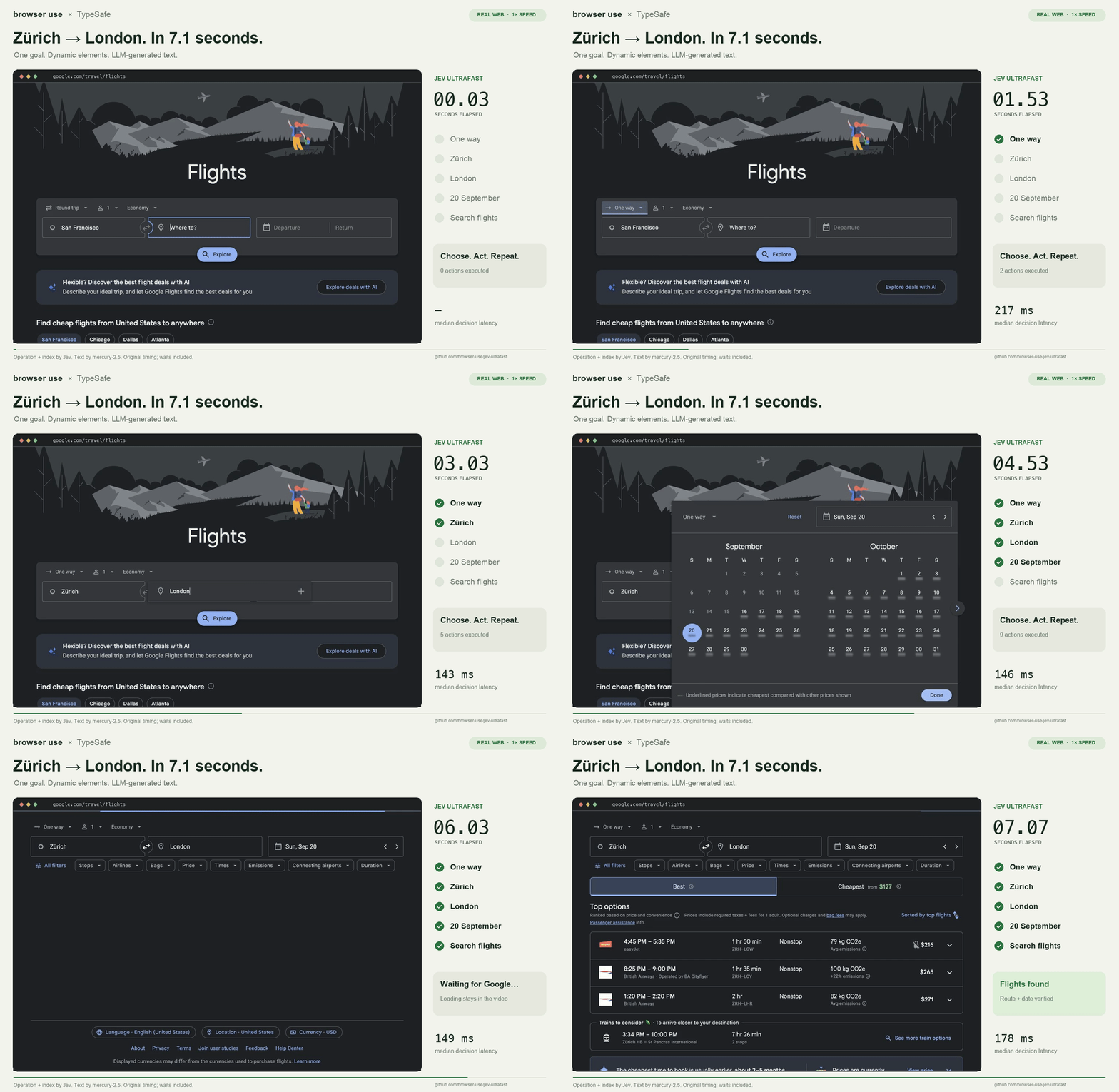
Jev Ultrafast controls websites through a numbered list of visible elements rather than screenshots. This reduces model calls, but the tool remains young and clearly limited.
What this is about
Jev Ultrafast is an open tool from Browser Use and TypeSafe for automated browser tasks. Instead of repeatedly sending a website as an image to a large language model, the agent reads visible controls from the DOM, numbers them, and lets a model choose among a small set of permitted actions. The project appeared in September 2026 under the MIT license and can be tested locally with an existing Chrome profile.
The approach is relevant to teams building browser agents or studying their runtime and cost. It is not a finished assistant for arbitrary office work, but a small Python library with a local inspector and reproducible example flows.
What Jev Ultrafast actually does
After every page step, the tool creates a table of visible controls: buttons, text fields, select boxes, and their current values. The Jev model decides the next operation and the compatible target at the same time. Only when text must be entered does a separate small language model generate the content.
The executable operations are deliberately narrow: click, type text, select, scroll, wait, report completion, or report a block. Before input, the executor checks whether the observed element is still current and unobstructed. Model responses are not executed as CSS selectors, coordinates, JavaScript, or shell commands.
The reference implementation connects to Chrome through Browser Harness. A local inspector displays elements, probabilities, and actions; a “Choose next” mode lets a person stop each step before execution. The example also requires access to a compatible text model.
Why it matters
Image-based browser agents transmit many pixels even when only a few visible controls matter for the next step. Jev Ultrafast reduces this decision to a dynamic, typed action space. That can lower latency, token use, and accidental interactions while making control flow easier to inspect.
The repository documents a Google Flights run lasting 7.073 seconds. Across six alternating trials, both compared versions passed three out of three runs; the project reports that median time fell from 9.450 to 7.092 seconds. This is explicitly not a general benchmark: it covers one task, one browser profile, and few repetitions. The project is therefore more valuable for its inspectable architecture and stated measurement limits than for one speed number.
In plain language
Instead of sending a helper a photo of an entire supermarket after every move, Jev gives the helper a current list: “1 entrance, 2 cart, 3 fruit aisle.” The helper chooses one permitted action and the matching number. This saves information, but it only works while important objects appear correctly on the list.
A practical example
A travel team wants to check daily whether suitable flights are visible for one route. The agent opens the search page, recognizes ten relevant fields, and enters origin, destination, and date in sequence. After every run, an independent checker confirms that the route and date really appear on the results page. Across 100 runs, the team records runtime, model cost, blocked controls, and false completion reports before considering production use.
The sensible first test is smaller: clone the repository, place keys in a local environment, run the bundled Wikipedia example, and then add a harmless read-only flow. Bookings, payments, and account settings should remain out of scope at first.
Scope and limits
First, the DOM reader handles common HTML and ARIA controls but does not yet reliably cover all shadow roots, frames, canvas interfaces, uploads, pop-up tabs, or unusual keyboard widgets. If a control is missing from the observation, the agent cannot operate it sensibly.
Second, the published performance test is small and limited to a few tasks. A fast flight-search run does not prove reliability on arbitrary sites. Third, the agent uses the existing Chrome profile and may therefore reach authenticated sessions. Operators must provide test profiles, limited privileges, approvals, and prompt-injection defenses. A “DONE” decision also needs independent outcome verification.
SEO & GEO keywords
Jev Ultrafast, Browser Use, TypeSafe Jev, browser agent, browser automation, structured actions, DOM agent, Browser Harness, open source AI, MIT license
💡 In plain English
Jev Ultrafast lets a browser agent choose from a numbered list of visible controls. This can be faster and cheaper than repeated image analysis, but it does not yet cover every web interface.
Key Takeaways
- →The agent uses structured DOM data rather than screenshots by default.
- →The operation and its compatible target are selected in one model request.
- →The reference implementation is MIT-licensed and locally inspectable.
- →Published speed figures come from a small set of narrowly scoped tests.
- →Authenticated browser profiles require limited privileges and independent outcome checks.
FAQ
Is Jev Ultrafast a finished office assistant?
No. It is a young Python library and reference implementation for developers of browser agents.
Does the tool need a language model?
Yes. Jev makes the action decision, while the example uses an additional compatible small model for text input.
Can it operate every website?
No. Frames, canvas, uploads, pop-ups, and other interfaces remain limited according to the project.
Should the agent use my normal browser profile?
It technically can, but a separate test profile with limited privileges is much safer for initial trials.