
Krita AI Diffusion brings targeted AI editing to the canvas
November 12, 2026
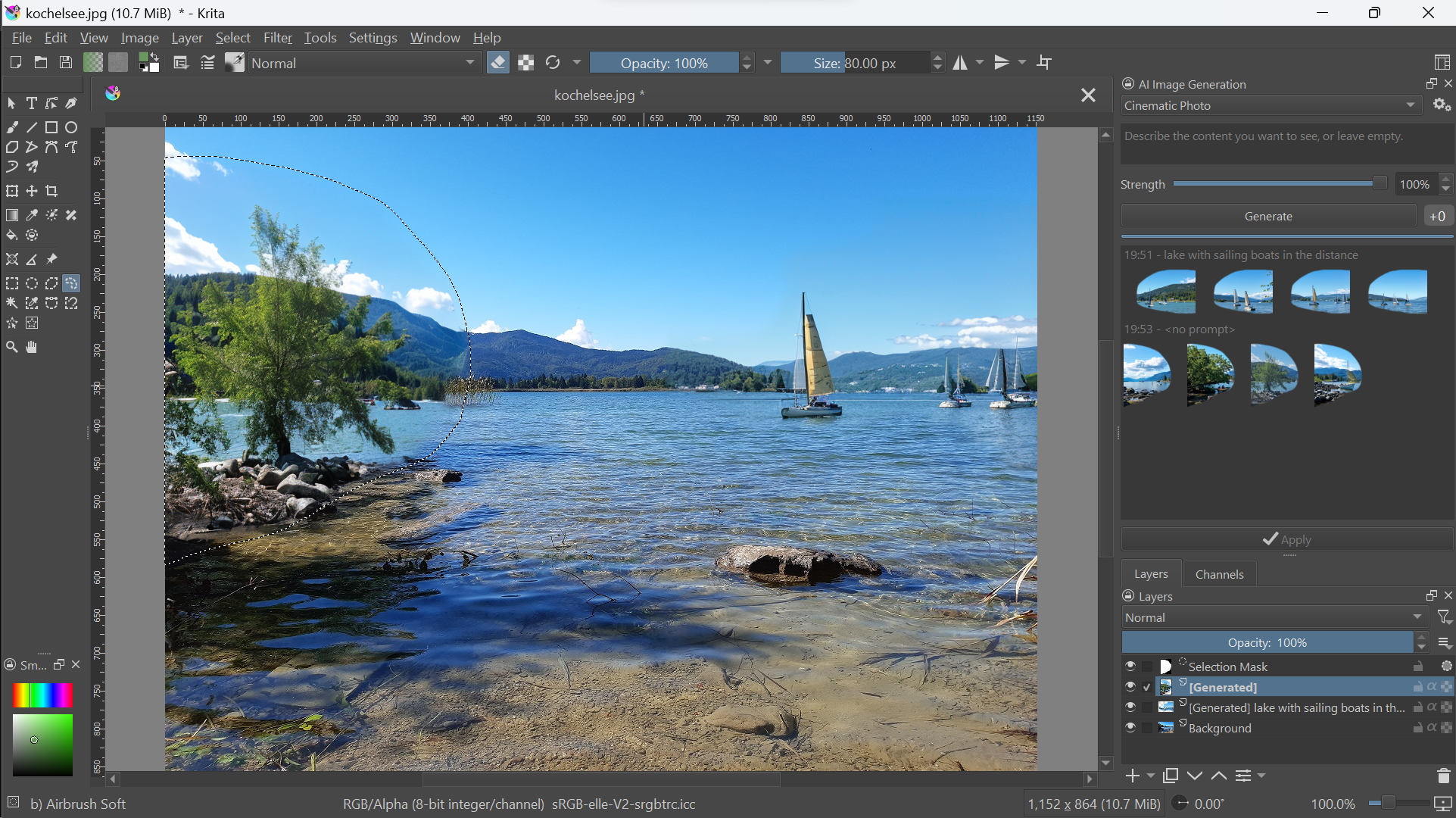
The open plugin combines painting tools with generative fill, image variations and local processing. For creatives, control over individual image regions matters more than the text prompt alone.
What this is about
Krita AI Diffusion, also called “Generative AI for Krita” by the project, adds generative image editing to the painting application Krita. Instead of ordering a complete image in a browser, users can select and modify areas on their existing canvas, then continue editing by hand. The plugin is developed in the Acly/krita-ai-diffusion repository; its associated product website is Interstice.
This tool check, dated November 12, 2026, describes an available tool, not a launch happening today. It is based on live checks of the project documentation and the cloud service’s statements. We did not perform an installation test or an image-quality comparison. The plugin is particularly relevant to illustrators, concept artists and people already working with layers, selection masks and brushes.
What Krita AI Diffusion actually does
The plugin can generatively fill selected image regions, add or remove objects and extend scenes beyond their previous boundaries. Users can control the strength of a revision. Reference images, sketches, line art and other control inputs guide the model. Regions allow different descriptions to be assigned to different image areas. A job queue and history help manage variations.
The key distinction is between the interface and computation: Krita remains the workspace, while the plugin connects it to a backend. According to the installation guide, users can choose a managed local server, their own ComfyUI installation or the online service. A custom ComfyUI instance needs compatible extensions and models; an arbitrary existing installation is therefore not automatically compatible.
To get started, users install the plugin ZIP through Krita’s Python plugin import. After restarting, the “AI Image Generation” docker becomes available. Version matching matters: the guide distinguishes Krita 5.x with plugin 1.x from an upcoming 2.x branch for Krita 6.x. Before downloading, check the currently specified combination rather than simply choosing the highest version number.
Why it matters
The practical benefit is targeted revision. Someone who only wants to change a background does not need to regenerate the entire composition each time. Drawing, selecting, generating and correcting stay within the same working context. This is especially relevant when a draft is mostly right but missing individual elements. People without image-editing experience still face a learning curve.
Spatial guidance is more than a marketing phrase: the academic ControlNet paper describes how edges, depth information or poses can condition image generation. The repository lists ControlNet among its underlying technologies. The publication explains the technical approach but is not an independent quality assessment of this plugin.
The plugin can be used locally for free; its repository specifies GPL-3.0. That does not mean hardware, electricity or all model rights are free or unrestricted. The optional cloud service charges through prepaid credit. On the check date, it lists, for example, €10 for 5,000 tokens. Consumption depends on the job and is displayed in the interface; this does not establish a universal fixed price per image. According to the legal notice, the operator is Cosmic Interstice UG (haftungsbeschränkt), based in Mannheim, Germany.
In plain language
Think of the workflow as repairing a painted wall: you tape off the area that should change and describe the addition you want. The AI supplies a suggestion within that assignment. You then remove the tape, inspect the transitions and touch them up with a brush. The selection and sketch replace part of a lengthy explanation, but they do not replace the final inspection.
A practical example
A fictional illustrator is designing a poster with a landscape they painted themselves. They want to try three versions of a signpost without repainting the sky. First, they save a copy, select a small area beside the path and generate three suggestions in sequence. They then inspect shadows, perspective and transitions into the grass. They add lettering themselves rather than relying on correctly generated text.
The sensible next test is just as small: one owned, non-sensitive image, one selection and three variations. Record waiting time, any credit consumption and the amount of manual cleanup. A result counts as useful only when it fits cleanly into the existing image. These numbers describe a test plan, not measured performance. Keep the original so that the change can be compared at any point.
Scope and limits
- Quality and rights: Generated details can be implausible; a good selection does not guarantee correct perspective. Model licences, rights to reference material and suitability for the particular commission need separate checks. The plugin replaces neither artistic oversight nor rights clearance.
- Hardware and setup: Local processing requires suitable drivers, models and sufficient storage. The documentation specifies at least 10 GB of installation space and says 50 GB or more is not unusual with optional packages. CPU operation is described as very slow. Anyone unwilling to maintain a setup should weigh that effort against the cloud option.
- Privacy and costs: Local and online are different operating modes. The privacy policy says no information is exchanged during offline use. For the cloud service, it identifies possible image processing outside Germany, including Canada or the United States. Confidential client images should therefore not be sent to an online job without review. Check current terms and the selected backend before production use.
SEO & GEO keywords
Krita AI Diffusion, Generative AI for Krita, Interstice, Acly, ComfyUI, ControlNet, inpainting, local image generation, creative image editing, open-source plugin
💡 In plain English
The plugin adds AI tools for selected image regions to Krita. You can generate suggestions and then correct them with ordinary painting tools. Whether images stay local or go to a service depends on the selected backend.
Key Takeaways
- →Krita AI Diffusion combines generative image editing with Krita’s existing canvas.
- →Selections, sketches and references help direct targeted changes.
- →Local operation and the optional cloud service have different hardware, cost and privacy implications.
- →The plugin’s GPL-3.0 licence does not replace checks of the model licences in use.
- →A small comparison with three variations reveals how much manual cleanup remains.
FAQ
Is Krita AI Diffusion a standalone painting application?
No. It is a plugin for Krita and also needs a backend for image generation.
Do I have to use the cloud service?
No. The documentation describes a managed local server and a custom ComfyUI installation as alternatives. These require suitable hardware, models and setup.
Is it free to use?
The plugin can be used locally for free. Hardware and operation may incur costs; the optional cloud service uses paid credit after a limited free introduction.
Do my images stay on my computer?
For fully local offline use, the provider describes no information exchange. With a cloud or other remote backend, data is processed outside the computer.
Sources & Context
- Interstice — Plugin and image generation service
- Acly/krita-ai-diffusion — repository, features and licence
- Krita AI Handbook — Plugin Installation
- Interstice — Imprint
- Interstice — Image Generation Cloud and pricing
- Interstice — Privacy Policy
- Zhang, Rao, Agrawala — Adding Conditional Control to Text-to-Image Diffusion Models
- Acly — official inpainting screenshot