
Magpie routes coding agents across models and providers
October 24, 2026
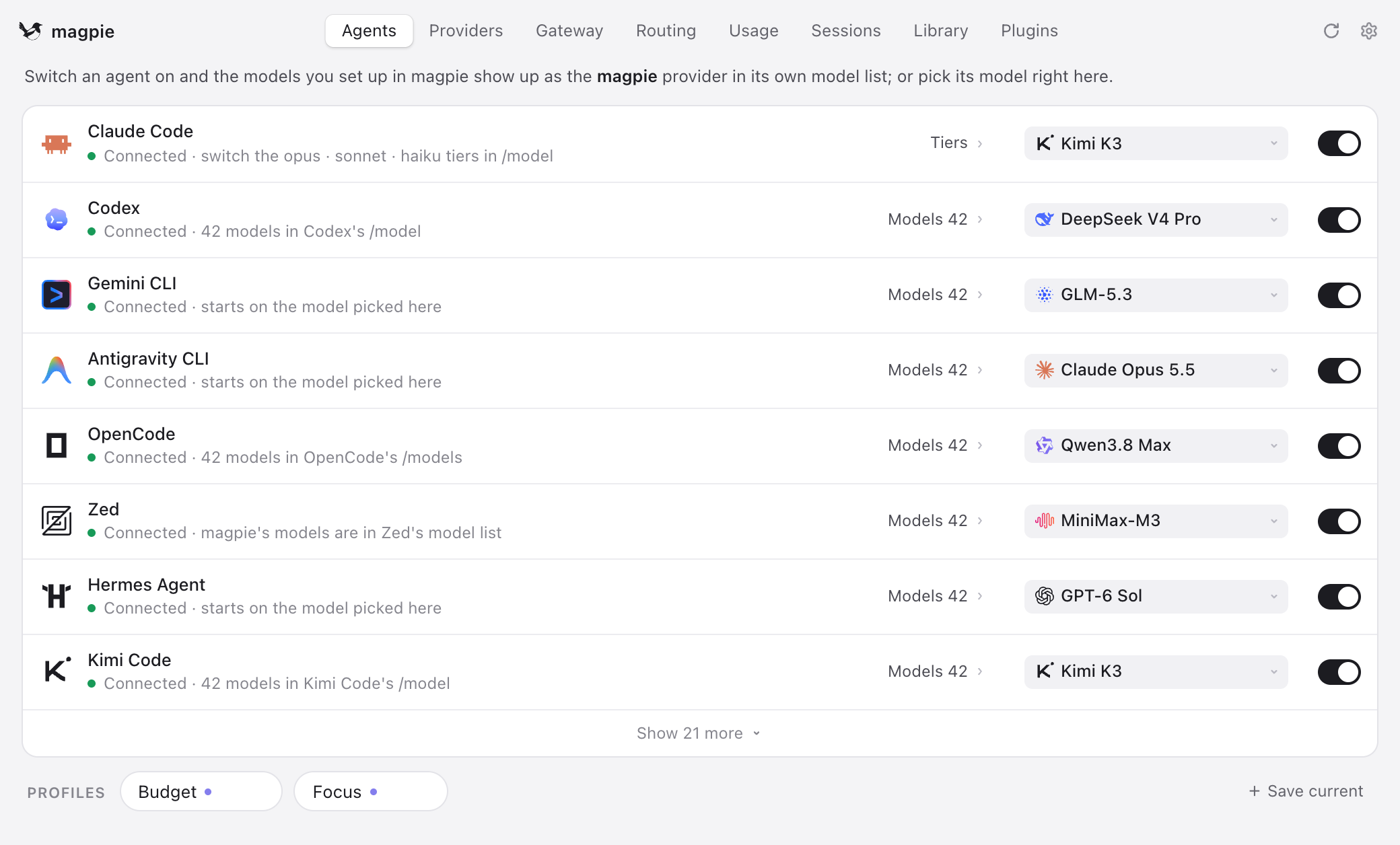
Magpie combines model selection, accounts, and failover routes for coding agents in one local gateway. It reduces configuration work but requires careful handling of credentials and service terms.
What this is about
Magpie is an open source application that connects several coding agents and model providers through a local gateway. The project was published on September 23, 2026, and its repository lists support for macOS, Windows, Linux, Docker, and Termux. Instead of configuring Claude Code, Codex, Gemini CLI, or OpenCode separately, users select models and accounts in one place.
Its practical value is not a new model. Magpie reorganizes existing tools: a team can run an agent with another compatible model, manage several accounts, and move to a defined alternative when a quota is exhausted. The source code uses the MIT license.
What Magpie actually does
Magpie starts a gateway on the user's machine by default. According to its documentation, it understands the OpenAI, Anthropic, and Gemini interfaces and translates requests including streaming, tool calls, and reasoning signals. Coding agents therefore connect to one local address while Magpie forwards each request to the selected provider.
The interface detects supported agents, can update the relevant configuration atomically, and stores profiles for different ways of working. Routing groups offer fixed order, rotation, usage distribution, or selection based on remaining quota. In addition to API keys, the project supports local models and sign ins from certain subscriptions. An off switch prevents Magpie from automatically discovering existing account credentials.
Why it matters
People who test several coding agents often maintain the same base URLs, model names, and credentials in different formats. That adds operational work and makes switching error prone. Magpie targets exactly this problem. It is especially useful for developers who combine local models, several commercial providers, or separate profiles for inexpensive and demanding tasks.
The public model catalog is supplemented through models.dev, according to the project. That is useful but does not replace verification: a model name in a catalog does not mean that a user's plan grants access or that every agent processes all features equally. The main value therefore comes from centralized configuration and visible routing, not a performance promise for the models themselves.
In plain language
Magpie is like a power strip with a selector switch. The coding agents are the appliances and the model providers are the power sources. Instead of rewiring every cable, you define in one place which appliance uses which source and which source takes over if the first fails. The power strip does not generate electricity, however, and it cannot turn a weak source into a strong one.
A practical example
A developer uses three agents: Codex for implementation, Claude Code for reviews, and Gemini CLI for large documents. She adds one API provider, one local model, and one permitted subscription. For daily work, she creates a routing group with three entries. The inexpensive API model is first, the local model second, and the stronger paid account last.
When the first quota is exhausted after 80 requests, Magpie sends new sessions to the next configured route. Existing conversations can remain with the previous account while its prompt cache is still useful. Before adoption, the developer uses a small test project to check whether tool calls, file access, and long answers behave consistently on every route.
Scope and limits
- Magpie handles sensitive credentials. Users should review the documented privacy options, disable automatic account discovery when appropriate, and install only trusted extensions.
- Using a subscription outside its originally intended client may be restricted by the provider's terms. Magpie can make a route technically possible but does not guarantee contractual permission.
- Translation between different interfaces can create edge cases. Tool calls, reasoning fields, and new provider features should be tested before production work.
- Automatic failover does not control spending. Several active keys and accounts can spread costs while also making them harder to track.
- Someone who uses one agent with its standard model will probably gain little from the additional layer.
The next sensible test is a non sensitive sample project with two providers. Users should compare routing logs, errors, cost reporting, and tool call quality before connecting real repositories.
SEO and GEO keywords
Magpie, coding agents, local AI gateway, model routing, Claude Code, OpenAI Codex, Gemini CLI, OpenCode, provider switching, local models, MIT license, developer tools
💡 In plain English
Magpie is a local control center for several coding agents and model providers. It simplifies switching and failover but requires careful control of credentials, costs, and provider rules.
Key Takeaways
- →Magpie connects several coding agents to different model providers through a local gateway.
- →Profiles and routing groups combine model selection, accounts, and failover routes.
- →The project uses the MIT license and supports several desktop systems as well as Docker.
- →Automatic account discovery can be disabled for privacy reasons.
- →Users must verify service terms, costs, and interface differences themselves.
FAQ
Is Magpie its own AI model?
No. Magpie brokers connections between coding agents and existing models or providers.
Can Magpie use local models?
Yes. The documentation names Ollama and LM Studio among other compatible local endpoints.
Does Magpie store credentials?
The tool manages API keys and can discover existing sign ins. Users should inspect storage and privacy options and disable automatic discovery when appropriate.
Who benefits from the tool?
It is mainly useful for developers who regularly combine several agents, providers, accounts, or local models.