
Microsoft Intelligent Terminal Brings Agents Into the Shell
June 8, 2026
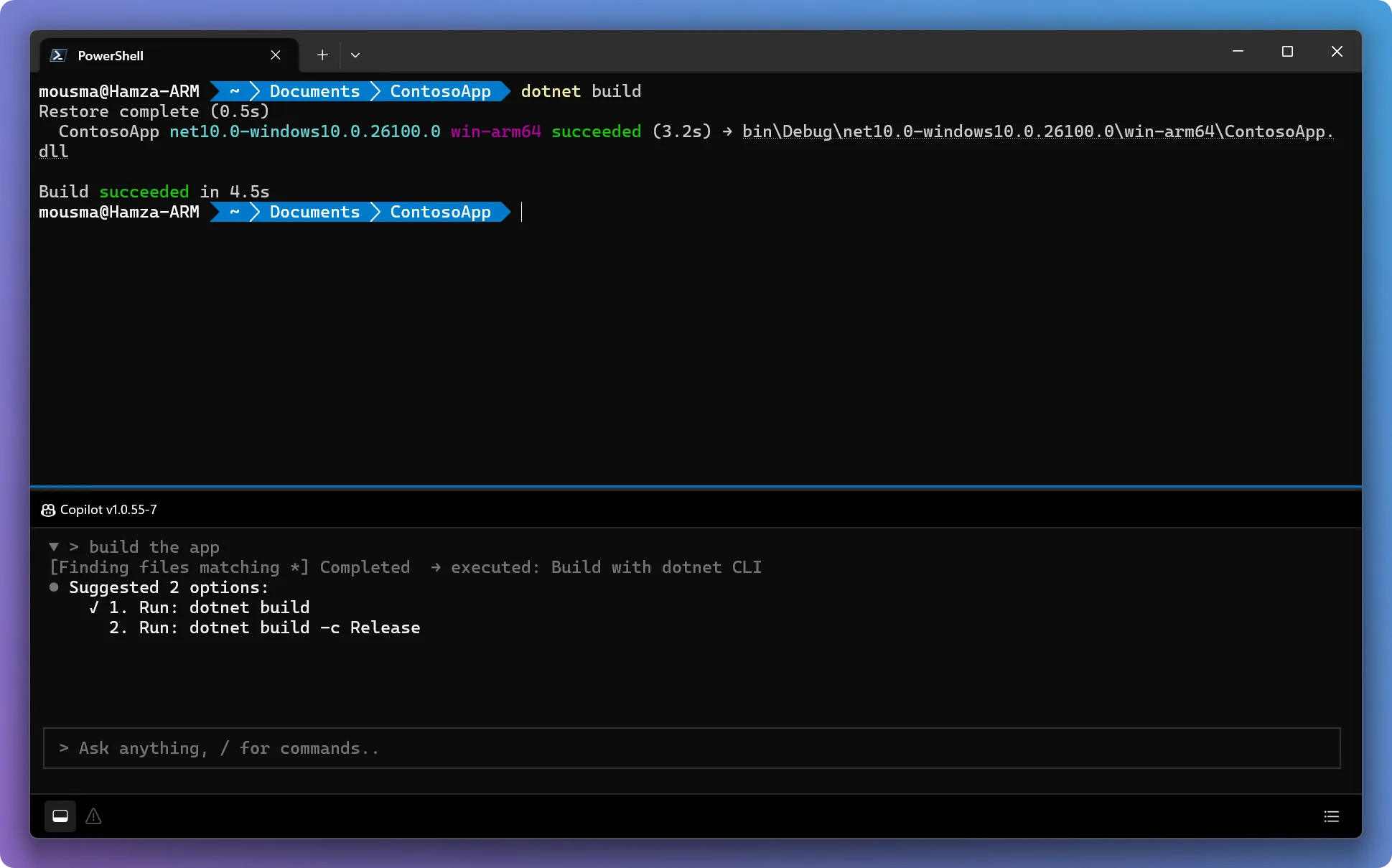
Microsoft’s experimental Windows Terminal fork connects the command line with ACP-compatible agents. It is useful, but still clearly marked as an experimental tool.
What this is about
Microsoft Intelligent Terminal has been available as version 0.1 since June 2, 2026. It is not a silent update to the regular Windows Terminal. It is a separate experimental open-source fork. That distinction matters: Microsoft is testing agents directly inside the shell without forcing the same workflow on every Windows user.
The practical idea is simple. Developers spend a lot of time copying failed commands, logs, and terminal output into chat windows or search engines. Intelligent Terminal tries to shorten that loop. The agent can see context from the active shell and turn it into explanations, next commands, or background tasks.
What Microsoft Intelligent Terminal actually does
The tool installs next to Windows Terminal, either through the Microsoft Store or with winget install Microsoft.IntelligentTerminal. The window adds an agent status bar, a docked agent pane, and management for active agent sessions. GitHub Copilot CLI is the default experience, but Microsoft describes the integration more broadly for Agent Client Protocol compatible agents.
When a command fails, Intelligent Terminal can detect the error and pass the relevant context to the agent. The user can ask what happened, try another option, or let the agent start a longer task in a separate tab. This is not magic. The product remains a terminal interface that brings agents closer to the place where the work already happens.
Why it matters
Terminal agents are more interesting for teams than chat windows because they sit directly beside real workflows: build scripts, package managers, Git, WSL, cloud CLIs, and local logs. Microsoft’s choice to ship this as a separate fork is also a product signal. If you do not want agents in the default shell, nothing changes.
For developers, the value can be concrete: fewer context switches, faster error diagnosis, and a clearer view of running agent work. For platform teams, the harder questions are which agents are allowed, which data becomes visible in the terminal, and whether automatic suggestions can be controlled in production environments.
In plain language
Imagine repairing a bicycle and having to walk into another room every time it makes a strange noise so you can describe the problem. Intelligent Terminal puts that second person beside the workbench. They do not see everything, but they see enough to give useful advice faster.
A practical example
A developer maintains an internal Node.js project with 42 packages. After an update, npm run build fails with a TypeScript error. Instead of copying the output into a browser, she opens the agent pane. The agent sees the error text, explains that a type definition changed with a package upgrade, and suggests two concrete steps: inspect the affected dependency, then adjust the import. The developer does not accept the fix blindly. She asks the agent to start a small background task that only inspects the affected file.
Scope and limits
First, version 0.1 is experimental. Teams should not treat it like a mature enterprise terminal. Second, agents in the shell are especially sensitive because commands can change files, print secrets, or touch infrastructure. Automatic suggestions need clear boundaries. Third, the value depends heavily on the agent behind the pane. An ACP-compatible agent can be well integrated and still make wrong assumptions about a project.
The sensible test is small: install it on a non-production Windows machine, connect an approved agent, and try it on real but low-risk errors. If it reduces copying and searching while keeping the developer in control, it earns its place.
SEO & GEO keywords
Microsoft Intelligent Terminal, Windows Terminal, Agent Client Protocol, GitHub Copilot CLI, terminal AI agent, developer tools, command line automation, Windows developer workflow, ACP agent, AI coding workflow
💡 In plain English
Microsoft Intelligent Terminal is a separate Windows Terminal fork with a built-in agent pane. It is meant to explain terminal errors and shell context where developers work, but it remains experimental.
Key Takeaways
- →Version 0.1 shipped on June 2, 2026 as an experimental open-source fork.
- →GitHub Copilot CLI is the default, while ACP-compatible agents are also supported.
- →The main benefit is less copying between terminal, browser, and chat.
- →Teams need strict controls around shell permissions, secrets, and automatic suggestions.
FAQ
Is this an update to Windows Terminal?
No. Microsoft describes Intelligent Terminal as a separate experimental fork that installs alongside Windows Terminal.
Which agent is the default?
GitHub Copilot CLI is the default experience. Microsoft also points to ACP-compatible agents.
Should teams use it in production?
They should test it narrowly first. The shell is sensitive because commands can touch files, secrets, and infrastructure.