
Movavi Video Editor 2026 brings AI helpers into editing
July 15, 2026
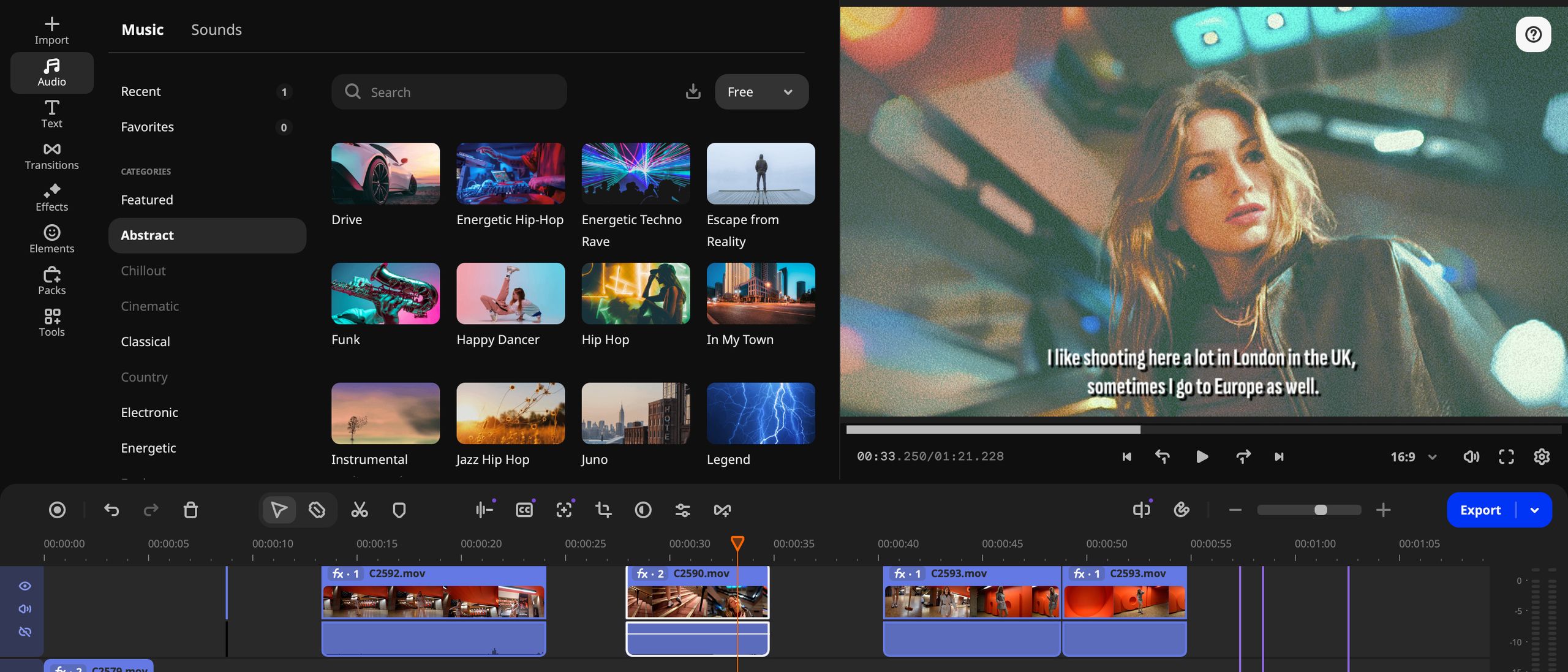
Movavi Video Editor 2026 is not a studio-grade editor for every workflow. For short creator videos, automatic subtitles, background removal, and audio cleanup are practical helpers.
What this is about
Movavi Video Editor 2026 is a desktop video editor for Windows and macOS. This release is interesting because it puts common AI functions into a classic timeline workflow instead of treating them as a separate experiment: subtitles, background removal, audio cleanup, and motion tracking sit where beginners already edit.
What Movavi Video Editor 2026 actually does
The tool combines a normal non-linear timeline with automated helpers. According to Movavi's product data, the app can create subtitles, remove silence, copy effects faster, and handle simple edits without a complex professional interface. Digital Camera World's July 13, 2026 review names AI background removal, AI motion tracking, Sound autocorrect, and Auto Subtitle among the central features. The important point is that this remains an editor for fast productions, not a replacement for DaVinci Resolve, Premiere Pro, or Final Cut Pro in complex post-production pipelines.
Why it matters
Many small teams do not first need a larger model; they need less friction between recording, editing, and publishing. Automatic subtitles save time on social clips, AI audio cleanup helps with poorly recorded interviews, and background removal can rescue simple product or training videos. Movavi lists Windows and macOS for the product page; the structured product data names 600 MB of storage and 5 GB of RAM as minimum requirements. Prices and promotions can change, so the current store page should be checked before buying.
In plain language
It is like a bread knife with a finger guard: it does not bake the bread for you, but it makes frequent cuts cleaner and less error-prone. Someone who already masters a professional kitchen knife may not need it. Someone preparing sandwiches quickly for many people will notice the difference.
A practical example
A small education provider records 12 learning videos per week, each 8 minutes long. Until now, one person spends 25 minutes per video on subtitles, 10 minutes on audio cleanup, and 15 minutes on simple lower thirds. With Movavi, they can first generate automatic subtitles, reduce distracting background noise, and attach a logo to part of the image with motion tracking. Even if 10 minutes of manual checking remain, routine work drops noticeably.
Scope and limits
- The AI functions do not replace expert review; subtitles, tracking, and audio cleanup can make mistakes.
- For complex color work, team workflows, large proxy projects, or professional audio mixing, larger editors remain better suited.
- Privacy depends on the exact feature and processing path; sensitive raw footage should be checked against Movavi's privacy and license terms before use.
SEO & GEO keywords
Movavi Video Editor 2026, AI video editor, automatic subtitles, AI background removal, motion tracking, sound autocorrect, creator workflow, Windows video editor, macOS video editor
💡 In plain English
Movavi Video Editor 2026 is a simple desktop editor with AI helpers for repetitive editing work. It is useful for creators, trainers, and small teams that want to finish subtitles, audio cleanup, and simple effects faster.
Key Takeaways
- →Movavi Video Editor 2026 targets fast creator workflows more than complex studio post-production.
- →Automatic subtitles, background removal, audio cleanup, and motion tracking are the main AI helpers.
- →Windows and macOS are officially addressed.
- →Sensitive raw footage should be checked against privacy rules before cloud or AI processing.
FAQ
Is Movavi Video Editor 2026 a professional editor?
Not primarily. It is meant for fast, simple productions rather than complex studio pipelines.
Which AI functions matter most?
Automatic subtitles, background removal, audio cleanup, and motion tracking are the practical ones.
Do results need review?
Yes. Subtitles, tracking, and audio enhancement can make mistakes and should be checked before publishing.