
Onyx brings team knowledge and AI search into one system
August 11, 2026
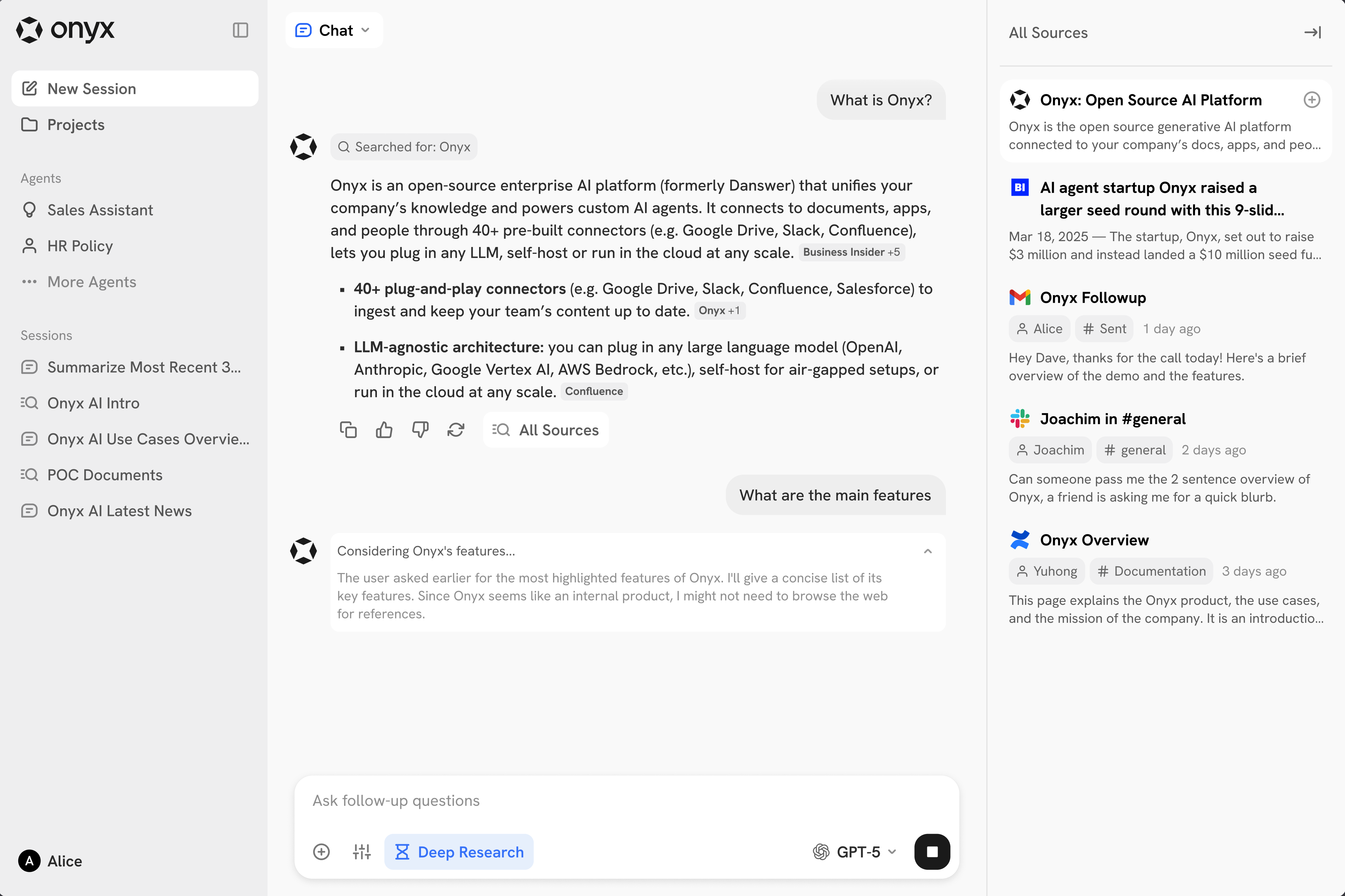
Onyx connects internal documents, apps, and multiple language models in a self-hostable workspace. This tool check examines its value, operational effort, and limits.
What this is about
Onyx is an open AI platform for teams that brings internal documents, connected applications, and language models into one interface. Users can ask questions about company knowledge, create agents, search the web, and analyze data with a code interpreter.
The tool is not new, but it remains relevant: many companies spread knowledge across wikis, tickets, drives, and chats. Onyx offers a Community Edition under the MIT license, plus cloud and enterprise editions. Its documentation describes both a lightweight chat interface and a full deployment with a search index and background services.
What Onyx actually does
Onyx indexes content from connected sources and combines vector and keyword search. According to the project description, it provides more than 50 indexing-based connectors as well as MCP connections. The platform can combine internal search, web search, multi-step research, custom agents, actions, and code execution.
Teams can use different model providers. The README lists self-hosted systems such as Ollama, LiteLLM, and vLLM alongside commercial APIs from Anthropic, OpenAI, and Google. The Community Edition covers core chat, RAG, agent, and action features. Capabilities such as advanced role management or larger enterprise integrations may be reserved for the Enterprise Edition.
There are two deployment paths. According to the README, Onyx Lite needs less than one gigabyte of memory and is intended for testing chat and agent features. The standard deployment adds a vector and keyword index, queues, workers, model servers, Redis, and MinIO. That also increases operational effort substantially.
Why it matters
A central advantage is choice. A team does not have to move all content into one SaaS product or remain tied to one model provider. Self-hosting can help with privacy, customization, and cost control. It does not solve these issues automatically: administrators still need to configure permissions, logs, backups, and external model calls carefully.
The practical value appears where one question would otherwise require several systems. Support, sales, and engineering can use a shared search while source permissions are meant to be respected. Actions and MCP can extend the interface from answering questions to performing tasks. That also raises the risk: an agent with write access requires tighter boundaries than a search function.
In plain language
Onyx is like a librarian in a large company archive. The librarian knows the shelves but may open only cabinets for which the employee has a key. Give the librarian tools, and they can initiate work instead of merely finding documents. You then need precise rules about which tool may be used and when.
A practical example
A 20-person support team manages 8,000 help pages, 40,000 tickets, and technical notes across several systems. An employee asks, “What known causes produce error 502 after the update?” Onyx searches the permitted sources, provides a summarized answer, and links to the relevant documents.
For a controlled test, the team could index only 500 approved pages and evaluate 30 real support questions. It should record retrieval quality, missing permissions, incorrect sources, and response time. Additional data sources or actions should follow only when those results are sound. This turns a product claim into a measurable pilot.
Scope and limits
First, good search depends on good data. Outdated, contradictory, or poorly permissioned documents still produce weak answers with RAG. Second, the standard deployment is not a small side project: indexes, workers, storage, updates, and model access require operations and monitoring. Third, agents, code execution, and actions create a larger attack surface. Write actions should be disabled by default, then introduced with least privilege, approvals, and logging.
Licensing and cost also require attention. The repository describes the Community Edition as MIT-licensed, while some enterprise capabilities are sold separately. Model, search, and infrastructure costs depend on the chosen configuration. Before deployment, a team should determine which data leaves its network and which required features are actually available in the open edition.
SEO & GEO keywords
Onyx, enterprise search, internal AI search, open source AI, self-hosting, RAG, MCP, knowledge management, AI agents, privacy, company knowledge
💡 In plain English
Onyx makes internal team knowledge accessible through one AI search interface. It can be self-hosted and connected to different models, but it requires careful permissions and reliable operations.
Key Takeaways
- →Onyx combines internal search, chat, agents, web search, and code execution in one interface.
- →The repository says the Community Edition covers core features under the MIT license.
- →More than 50 indexing-based connectors and MCP are intended to connect existing knowledge sources.
- →Onyx Lite lowers the barrier to testing, while the standard deployment requires additional services.
- →Write actions need least privilege, approvals, and complete logging.
FAQ
Can Onyx be fully self-hosted?
Yes. The project documents self-hosting with Lite and standard variants. External model or search services may still receive data when configured.
Is Onyx free?
The repository says the Community Edition is available under the MIT license. Infrastructure, models, and some enterprise features can still create costs.
Which data sources does Onyx support?
The project lists more than 50 indexing-based connectors as well as MCP. Teams should verify the right connector in the current documentation.
What should a team test first?
A limited pilot with approved documents and real questions reveals search quality, permission errors, costs, and operational effort.