
OpenWorker brings governed AI agents to the desktop
September 23, 2026
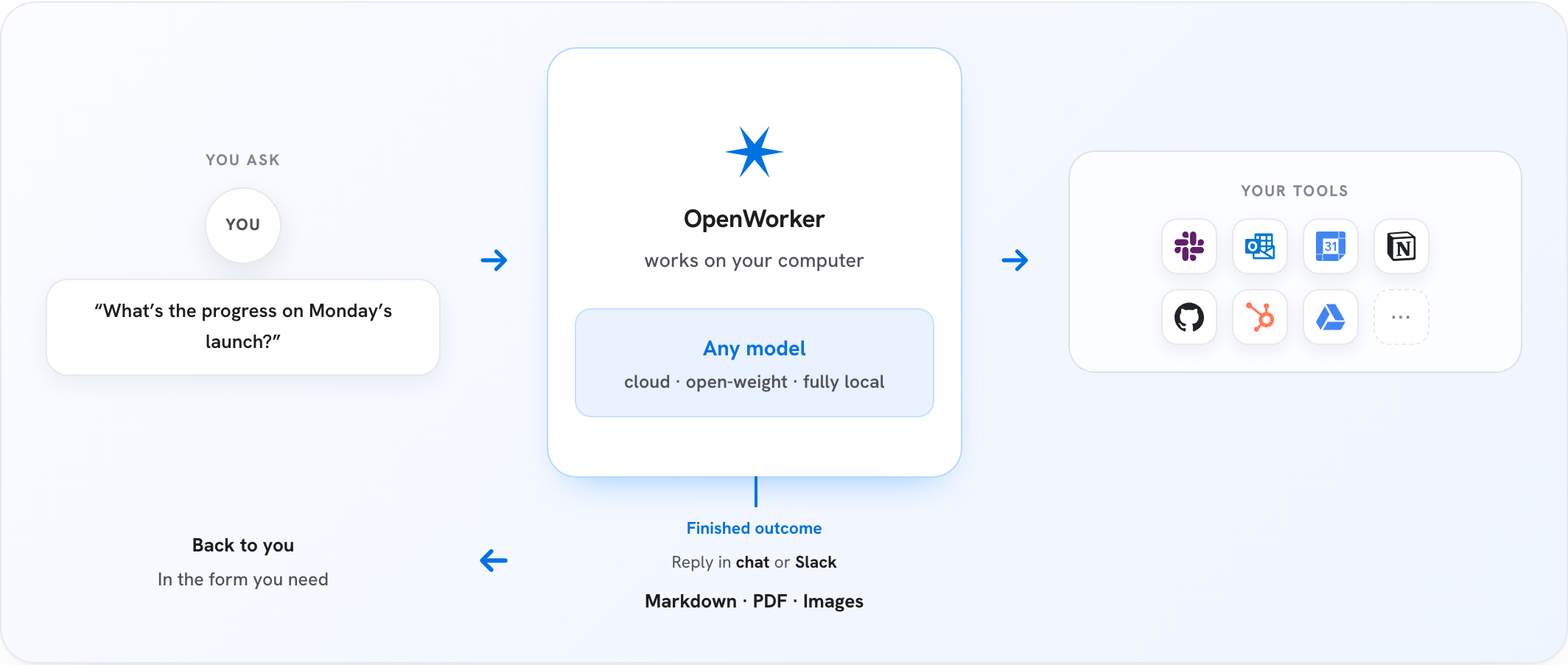
OpenWorker is a local desktop agent with model choice, integrations, and approval rules. The open beta offers a practical path to governed automation, but remains a young system with broad permissions.
What this is about
OpenWorker is an open-source desktop application for AI agents from Andrew Ng and contributors. Rather than only answering in chat, it is designed to create files, review code, carry out workflows through connected services, and schedule recurring tasks. The project explicitly describes itself as an open beta and uses the MIT license.
Downloads are available for macOS on Apple Silicon and for Windows 10 and 11 on x64. According to the project, the macOS build is signed and notarized, while Windows builds are not yet code-signed and may trigger SmartScreen warnings. OpenWorker supports several commercial model providers and local models through Ollama. That flexibility is useful, but changes data flows and costs depending on the selected model.
What OpenWorker actually does
The application combines a local Python agent runtime with a Tauri interface. Conversations, model keys, and connector tokens reside in the local secret store according to the project. A small cloud service brokers OAuth sign-ins for integrations, while manually created credentials are an alternative. Connections to GitHub, Slack, Jira, Notion, Linear, HubSpot, Outlook, Gmail, and other services are documented. Additional tools can be attached through MCP.
The approval model is the critical feature. Writes, external sends, and shell commands require approval by default. Certain dangerous or irreversible operations always remain human-only. Repeatedly accepted actions can gradually become visible, revocable rules. Every tool call is recorded together with its approval path. Unattended runs cannot approve their own requests and place them in an inbox instead.
Why it matters
Many desktop agents connect a capable model directly to files, a browser, a terminal, and business systems. Those permissions create the value, but they also increase the potential damage from a mistaken interpretation, a manipulated message, or overly broad access. OpenWorker therefore makes approvals and logs a visible part of the architecture.
This is relevant to small teams that want to automate recurring knowledge work without committing to one model vendor. Local models can keep sensitive content on the computer. With OpenAI, Anthropic, Google, or another hosted provider, however, content sent to the model is processed under that provider's terms. Connected SaaS products also retain their own data and permission paths.
In plain language
Imagine a new assistant with keys to the office, filing cabinet, and mail room. The assistant can accomplish a great deal but should not be allowed to mail every contract on day one. OpenWorker behaves like a key board with approval levels: some keys are handed out one at a time, proven routines can later be allowed, and especially risky doors remain under human control. The log records which key was used and when.
A practical example
A ten-person software team wants to produce a security report every Friday. OpenWorker initially receives read-only access to a test repository and the issue tracker. The agent gathers open security notices, runs a deterministic scanner, and creates a report file. Every shell command and planned write requires approval.
After four supervised runs, the team allows only the known scan command and writes to one designated report directory. Creating tickets and sending messages to Slack still require approval. Two people compare the output with scanner logs and measure false positives, missed findings, and handling time. Only then is a scheduled run enabled.
Scope and limits
First, OpenWorker is a beta. Bugs, interface changes, and incomplete integrations are more likely than in a long-established product. Second, approval gates are not guarantees: a person can overlook a harmful step, and a reviewer model remains fallible. Third, a locally running agent loop does not automatically mean local data processing; model providers, OAuth brokering, and connected services require individual review.
Standard desktop risks also apply. An agent with terminal, file, and connector access should start with least privilege, separate test accounts, and reviewable working directories. Legal, financial, or external communication should retain explicit human final approval.
SEO & GEO keywords
OpenWorker, Andrew Ng, desktop agent, local AI, AI automation, agent governance, human in the loop, MCP, Ollama, open-source agent, audit trail, model choice
💡 In plain English
OpenWorker is a local desktop app that connects AI models to files, a terminal, and business services. Approval rules and logs limit what the agent may do independently, but the open beta still requires cautious testing.
Key Takeaways
- →OpenWorker is an MIT-licensed desktop application for agentic workflows.
- →Users can choose hosted models or local models through Ollama.
- →Writes, sends, and shell commands require approval by default.
- →Tool calls are logged with their approval provenance.
- →A local agent loop does not prevent data transfer to selected models and integrations.
FAQ
Which operating systems support OpenWorker?
Downloads cover macOS 12 or later on Apple Silicon and Windows 10 or 11 on x64. The project says the Windows build is not yet code-signed.
Can OpenWorker use local models?
Yes. The project supports local models through Ollama and many hosted providers through users' own API keys.
Can the agent approve its own actions?
Writes and other risky actions require approval by default. Unattended runs place unresolved decisions in an inbox.
Does all data remain on the computer?
The agent runtime and local storage can remain on the computer. Selected model providers, OAuth brokering, and connected services may still receive data.