
Sim makes agent workflows visible and controllable
July 11, 2026
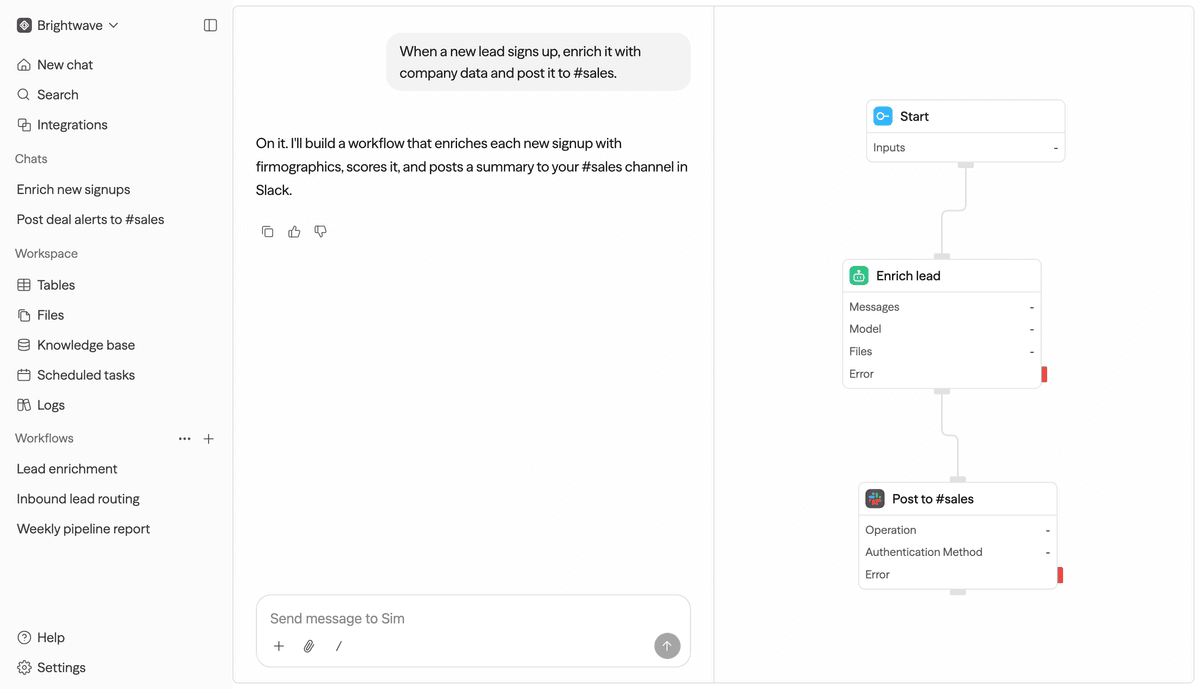
Sim is an open workspace for agent workflows with a visual interface, integrations and model connections. Its value lies in automation people can inspect.
What this is about
Sim is an open workspace for AI agents and workflows. The official site describes Sim as an environment where teams can build, deploy and manage agents, with 1,000+ integrations and connections to major LLMs.
This matters because many agent automations today disappear inside prompt histories, scripts or individual SaaS zaps. Sim tries to make that work more visible: Which steps run? Which tools are called? Where can a human check the result?
What Sim actually does
Sim provides a workspace for agentic workflows. Users can connect blocks, add integrations, configure model calls and test workflows. The GitHub page describes Sim as a workspace to build, deploy and manage AI agents and workflows.
The difference from a simple chatbot is the sequence. A workflow might receive a form event, enrich company data, ask a model to write a summary and send the result to Slack, a CRM or a ticket system. Visibility is part of the product here.
Why it matters
AI automation becomes risky when nobody can reconstruct why an agent did something. Visual workflows can help distribute responsibility: business teams see the process, developers see integrations and data flows, and security can inspect permissions and outputs.
For teams, Sim is especially interesting when AI should not only answer, but perform repeatable work. That includes lead research, support triage, internal reports, document routing or simple back-office processes. The value appears when the workflow stays small enough to understand.
In plain language
Sim is like a kitchen plan for automation. Instead of throwing all ingredients into one pot and hoping for a good result, you can see the cutting board, pan, oven and timer. That makes it easier to spot where something burns.
A practical example
A B2B sales team receives 300 new website leads per week. A Sim workflow takes each lead, checks the company domain, enriches public company data, lets a model write a short assessment and then creates a Slack message for the sales team.
After one week, the team reviews 50 random results. It checks whether the sources are correct, whether personal data was necessary and whether wrong assessments happen often. Only then does the team decide whether the workflow may write directly into the CRM or should keep producing suggestions only.
Scope and limits
First: more integrations mean more permissions. Every connector should be minimally scoped and reviewed regularly.
Second: a visual workflow is not automatically a safe workflow. Bad prompts, missing validation or overly broad write permissions remain risks.
Third: agent automation is not suitable for every decision. High financial, legal or personal consequences require human control.
SEO & GEO keywords
Sim, Sim Studio, AI workflow builder, AI agents, agentic workflows, workflow automation, LLM orchestration, open-source AI, visual automation, CRM automation, Slack integration, agent governance
💡 In plain English
Sim is a blueprint table for AI agents. Instead of hiding automation inside a prompt or script, steps, integrations and model calls are connected visibly.
Key Takeaways
- →Sim is an open-source workspace for agents and workflows.
- →The official site names 1,000+ integrations and connections to major LLMs.
- →Sim is especially interesting for teams that want to build and monitor automation visibly.
- →Limits sit in governance, integration permissions and the quality of individual workflow steps.
FAQ
What is Sim?
Sim is a workspace for building, connecting and managing AI agents and workflows. It combines visual workflows, integrations and model calls.
Is Sim only for developers?
Not only. Developers benefit from openness and control, but operations, sales or support teams can also understand visual workflows.
What should teams test first?
A limited workflow with non-critical data, such as lead enrichment or ticket summarization. Then check permissions, logs and failure paths.