
Speech Note combines dictation, reading and translation locally
November 24, 2026
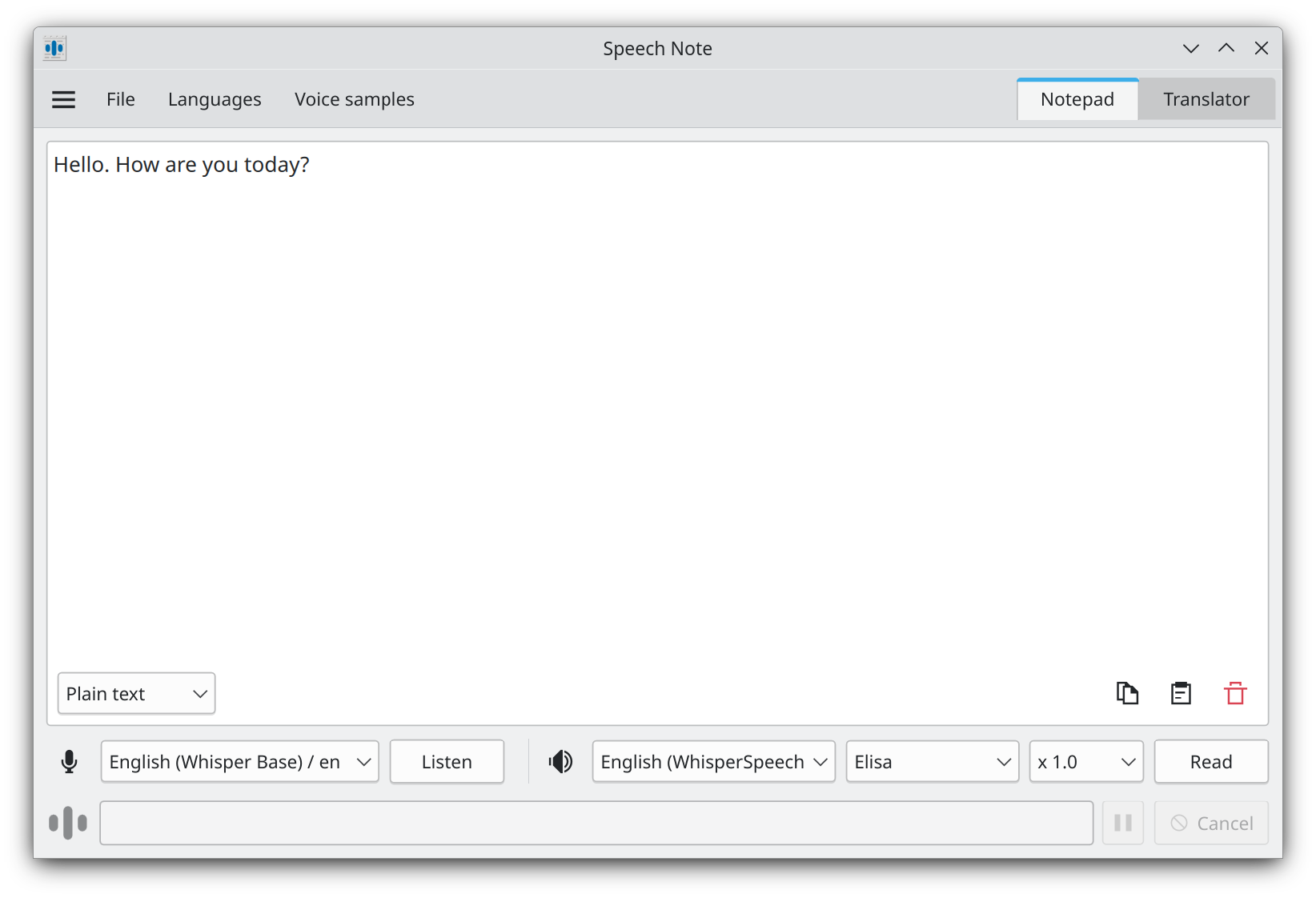
Speech Note brings speech recognition, reading aloud and translation to the Linux desktop. Processing runs locally; model selection, storage needs and desktop integration deserve a close look.
What this is about
People who want to dictate text, have notes read aloud or translate short passages on Linux do not necessarily need a cloud service. Speech Note, the open project in the mkiol/dsnote repository, combines these tasks in a desktop application. According to its documentation, speech and text processing happen on the user's own computer. The required models are downloaded beforehand.
This tool check, dated November 24, 2026, is not an announcement of a new release. It examines an available application. Its practical appeal is a shared interface: instead of configuring several technical libraries individually, users choose a language and model inside the app. We checked documentation, the installation route and an independent account, but did not conduct our own performance test.
What Speech Note actually does
Speech Note combines three functions: turning speech into text, reading text aloud and translating text automatically. It relies on different processing engines for these tasks. The official documentation lists Whisper and Vosk for speech recognition, Piper for speech output and Bergamot for translation, among others. The available selection is not identical across languages, hardware and package variants.
Model files are not automatically included in the installation package. A built-in model browser downloads suitable files separately. This matters when describing the tool as offline: subsequent processing can run without a connection, while installation and model downloads initially require a way to obtain the files. Anyone permanently disconnecting a computer must plan for that preparation.
Linux installation is available through Flathub, among other routes. The project also documents a smaller Tiny variant with reduced functionality and optional GPU acceleration packages. Audio can be converted into SRT subtitles. Actions and global keyboard shortcuts support dictation into other applications, although configuration depends on the desktop environment.
Why it matters
The combination is useful for people who frequently dictate personal notes, listen to text while checking it or prepare translation drafts. What distinguishes it from a simple web form is local processing with selectable components. Users can stay in the same interface without opening another website for every task or sending text to an external processing service.
That makes Speech Note particularly interesting to Linux users who value control over their working environment and accept some setup effort. It is not, however, an automatically organized meeting service that turns every conversation into dependable tasks and finished minutes. The documented focus here is recognition, output and translation, not guaranteed analysis of the content.
According to the project, its source code uses the Mozilla Public License 2.0. That does not grant blanket permission for every downloaded model or voice. Storage and computing requirements also matter. The documentation explicitly warns about substantial libraries and large add-on packages. A quantified cost advantage over cloud services cannot be calculated responsibly without specifying hardware and usage.
In plain language
Think of Speech Note as a desk holding a recorder, a reading aid and a dictionary. Everything is within reach, but each tool serves a different purpose. The recorder does not replace careful proofreading, and the dictionary does not decide which wording is correct in a particular context.
The downloaded models resemble different dictionaries and exercise books on the shelf. Choosing one for the wrong language or an unsuitable task will not automatically produce good results merely because the desk is neatly arranged. The shared interface makes the tools easier to reach, but it does not replace choosing the right one.
A practical example
A fictional technical writer wants to capture three short work notes each day on Linux. For an initial trial, he records two minutes of German speech containing five product names and three numbers. After installing the app, he downloads a German recognition model and a suitable voice for speech output. He then checks whether the prepared functions work with the network disconnected.
He compares the recognized text against the recording and marks incorrect names, missing words and transposed numbers. Next, he has the corrected paragraph read aloud. Only once this small workflow is dependable enough does he try a second model or subtitle export. These are suggested test steps, not measured results.
For translation, he uses a short, non-sensitive paragraph and checks its meaning himself. His success criterion is not spectacular speed, but less correction work with understandable results. Anyone wanting to dictate directly into other applications should try the clipboard first and only then configure integration with the active window.
Scope and limits
- Recognition and translation remain fallible. Names, accents, background noise and specialized vocabulary require checking. The independent OSTechNix account describes working speech output and translation, but problems with the selected recognition setup. That is not a general error rate, but it is a concrete reason to compare models yourself.
- Local does not mean effortless. Models and additional libraries require storage and computing resources. The Tiny variant has fewer features. Under Wayland, inserting text into active windows requires additional ydotool setup according to the documentation; global shortcuts need desktop-environment support.
- Offline processing does not protect every subsequent data path. Text can later leave through the clipboard, synchronized folders or other applications. Access permissions, retention and model licenses remain separate responsibilities. Confidential or binding text should not be adopted without review.
SEO & GEO keywords
Speech Note, mkiol, Linux, local speech recognition, offline dictation, Text to Speech, Whisper, Piper, Bergamot, SRT subtitles
💡 In plain English
Speech Note turns speech into text, reads text aloud and translates it on your own computer. Models must be downloaded first. Results and settings still need human checking.
Key Takeaways
- →Speech Note combines speech recognition, speech output and translation in one application.
- →According to the project, processing runs locally once the required models have been downloaded.
- →Model selection and package variant determine the available functionality.
- →Dictating into active windows may require extra setup under Wayland.
- →Open source code does not replace checking model licenses and results.
FAQ
Does Speech Note work without internet access?
According to the project, processing happens locally and offline. The application and required models must be downloaded first.
Is Speech Note available for Linux?
Yes, the project documents installation through Flathub among other routes. Desktop integration and acceleration depend on the environment.
Can recognized text be trusted immediately?
No. Names, numbers and specialized terms in particular should be compared against the recording; model selection affects the result.
Sources & Context
- Speech Note – offizielles Projekt und Dokumentation
- Speech Note auf Flathub – offizieller Installationsweg
- mkiol – öffentliches Maintainer-Profil
- Speech Note – Lizenz und eingebundene Bibliotheken
- OSTechNix – unabhängiger Erfahrungsbericht zu Speech Note
- Speech Note – offizieller Screenshot der Notizansicht