
Surya reads documents locally and preserves page structure
October 26, 2026
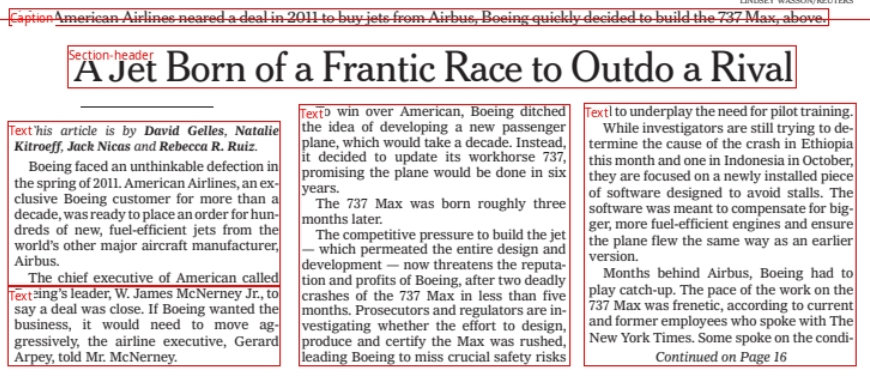
Surya combines text recognition, layout analysis and table processing. The tool can be tested locally, but its model license, computing requirements and incorrect associations deserve attention.
What this is about
A scanned page contains more than letters: headings, columns, tables and footnotes determine how its contents must be read. Surya from Datalab is a usable tool for precisely this preparatory work. It recognizes text and document structure and makes the results available to other software. That is relevant to developers, archives and teams preparing documents for search or an AI assistant.
This tool check is based on project documentation accessible on October 26, 2026. It is neither an announcement of a release today nor our own performance test. According to the provider's terms, Datalab is operated by Endless Labs, Inc. The focus here is not a new chat model, but an installable package with command-line tools, a Python interface and an interactive testing interface.
What Surya actually does
The current documentation describes Surya 2 as a shared vision-language model for text recognition, layout analysis and table recognition. The package processes images, PDFs or entire folders. Its OCR output contains recognized blocks in reading order, their positions on the page and content as HTML. This allows tables to be passed on as structured content rather than isolated words sitting next to each other.
The project specifies pip install surya-ocr for installation. An inference backend, the software that performs the model computations, is also required: Docker and the NVIDIA Container Toolkit are specified for NVIDIA GPUs; for CPUs or Apple Silicon, the project points to the llama-server binary from llama.cpp. Downloading the package alone is therefore not a complete installation.
Text recognition starts with surya_ocr DATA_PATH. For interactive inspection, the project documents surya_gui, with Streamlit and pdftext installed as well. The interface primarily provides an entry point for experimentation. Anyone handling recurring document volumes can integrate the command line or Python interface into their own workflow.
Why it matters
A downstream assistant can only work with the information it receives. If two columns are mixed together or a table heading is assigned to the wrong value, an error occurs before the actual question reaches the AI. Surya addresses this transition from a visible page to machine-readable structure. The stored positions can also help compare recognized content with the original page.
Independent benchmark infrastructure from Ai2 provides useful context: olmOCR-bench tests different document problems, including multi-column pages, tables and old scans. Its publicly visible leaderboard also lists Surya OCR 2. That does not prove that your own German-language forms will work equally well. Instead, it indicates which error categories an internal test should cover.
Local operation is an option for teams that do not want to send documents indiscriminately to a cloud service. It does not replace checking the actual configuration. Specifying a remote inference server changes where processing happens. Datalab's managed platform is a separate offering that uses other models alongside Surya; its results are not automatically Surya results.
In plain language
Think of Surya as a helper sorting a folder of paper documents. It does not just copy the words; it also marks which line is a heading, which numbers belong to a table and which note sits at the bottom of the page. Only then can the folder be searched sensibly. An incorrectly filed page remains incorrect, even if someone later talks about it very fluently.
A practical example
A fictional archive team selects twelve approved pages for an initial trial: four letters, four multi-column reports and four tables. Before starting, it records five important text passages or associations per page. That produces 60 concrete checkpoints instead of a general impression that the output looks good.
The team installs Surya in a separate test environment, configures the appropriate backend and processes one page first. It then checks the original to see whether headings, numbers and table cells have been associated correctly. Only after that does it process the whole small batch. Runtime, necessary corrections and memory usage are recorded; a fast run alone is not success.
The next sensible step would be a comparison with the existing method on those same twelve pages. Moving into everyday use is worthwhile only if results are sufficiently reliable for the particular document type and the correction effort remains acceptable. These numbers describe a proposed test plan, not measured Surya results.
Scope and limits
- Recognition remains fallible. Poor scans, unusual arrangements and incorrect table associations must be tested on your own collection. A confidence score does not guarantee factually correct content. Important amounts or identification numbers require checking against the original.
- Local operation means operational work. The backend, models, storage and access rights need setup and maintenance. Hardware and administration costs remain even without cloud billing. For confidential documents, network paths and output storage locations also need inspection.
- Code and model have different licenses. The code uses Apache 2.0, while the weights use a modified AI Pubs Open RAIL-M license. It includes revenue and funding thresholds, restrictions on competing offerings, and attribution and redistribution rules. Larger commercial deployments may require a separate license. The full terms matter more than the label “open source”; we therefore do not quote a blanket price covering every deployment.
Image credit: official layout example from Datalab's Surya repository, showing the title page of “Attention Is All You Need” by Vaswani and coauthors with recognized document regions. The repository and license texts are linked below.
SEO & GEO keywords
Surya OCR, Datalab, document recognition, layout analysis, table extraction, local AI, Python, llama.cpp, document processing, olmOCR-bench
💡 In plain English
Surya makes the text and structure of scanned documents usable by other programs. It can run locally. Testing with your own documents must establish whether it is reliable and economical enough.
Key Takeaways
- →Surya offers text recognition, layout analysis and table recognition as an installable tool.
- →A command line, Python interface and testing interface provide different entry points.
- →Local operation requires an appropriate inference backend and your own administration.
- →Apache 2.0 applies to the code, not automatically to the model weights.
- →A small, verifiable document set is the most useful first test.
FAQ
Is Surya a complete document repository?
No. It provides recognized content and structures. Search, storage or approval logic must be handled by another part of your system.
Must documents be uploaded to a cloud?
Not with a fully local backend. A remote inference server or the managed Datalab platform involves a different data path.
Is commercial use unrestricted and free?
No. Code and model weights have different terms; the model license includes commercial restrictions among other conditions. Review the full license texts before deployment.