
Upscayl enlarges images with AI on your own computer
October 28, 2026
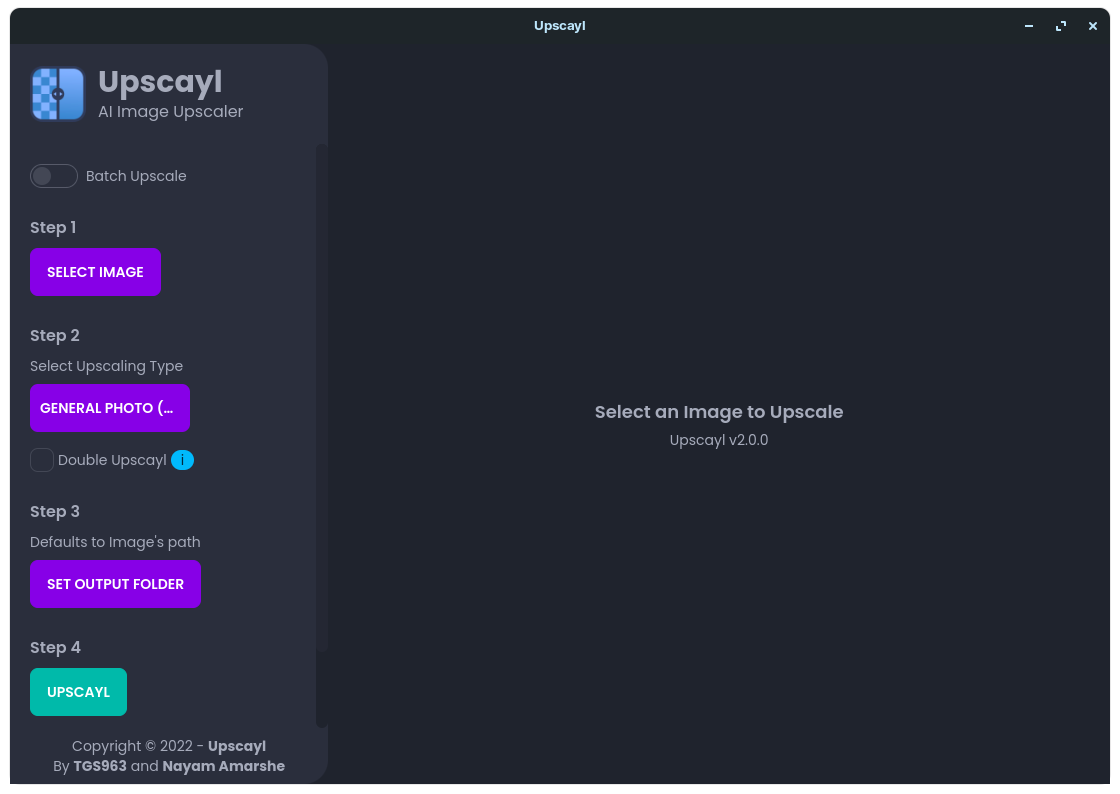
Upscayl Desktop enlarges photos and illustrations locally on Linux, macOS and Windows. This tool check explains its value, hardware limits and how it differs from the cloud.
What this is about
Upscayl Desktop enlarges images with AI on your own computer. The open-source project provides a graphical interface for Linux, macOS and Windows. It is relevant to people who want to reuse older web graphics, small illustrations or low-resolution photographs without sending each image to an online service.
This tool check, dated October 28, 2026, covers an already available application, not a new product launch. The official download page points to version 2.15. The distinction between the desktop app and Upscayl Cloud matters: the local application and the commercial online service are separate offerings. Features, prices and privacy promises should therefore not be transferred from one to the other without checking.
What Upscayl actually does
The basic workflow is straightforward: select an image, choose a suitable model, specify an output folder and start processing. Other options include batch processing and adding extra models. The project website also describes Double Upscayl, which processes an image twice. More passes do not automatically produce a more believable result, however.
According to its repository, Upscayl uses technologies including Real-ESRGAN and Vulkan-based processing. The model estimates what additional image details might look like. It does not recover a lost original file; it generates a plausible larger representation from the material available. The Real-ESRGAN research paper explains the restoration approach, but is not an independent quality assessment of the current Upscayl application.
The download page explicitly confirms local processing without an internet connection being required for the processing step itself. That makes the desktop route relevant to unpublished drafts. Installation, downloads and the security of the computer remain separate considerations. A local application does not automatically guarantee that the overall workflow is secure.
Why it matters
For small design teams, clubs and individuals, the value is less about spectacular AI imagery than about a narrowly defined routine task. An illustration that is too small for a presentation can be tried without first building an entire image-processing pipeline. The interface makes technology accessible that might otherwise involve model installation, command-line tools and hardware configuration.
The repository credits Nayam Amarshe and TGS963 as the project's creators and lists the AGPL-3.0 license. The official desktop download is offered free of charge. That does not mean every distribution channel or cloud plan is free; the download page itself flags the different Mac App Store offering. Anyone modifying or redistributing the software should examine the license obligations separately.
For picture editors, the key distinction remains this: visual usefulness is not the same as evidentiary value. An enlarged club illustration may serve its purpose. A seemingly readable number plate or reconstructed face must not be assumed accurate merely because it looks sharper.
In plain language
Think of Upscayl as someone redrawing a small, roughly sketched map at a larger size. Road edges become cleaner and areas look more consistent. But where the original contains only a blot, the person drawing has to guess what it represents. The larger map is easier to look at, but that does not automatically give it more reliable information about the location.
A practical example
A fictional cultural club has twelve older event images for a new presentation. One measures 800 by 600 pixels. Enlarging each side fourfold produces, mathematically, a 3,200 by 2,400-pixel file. That is sixteen times as many pixels, not sixteen times as much genuine information.
A sensible initial test starts with just three copies: an illustration, a photograph and an image containing small lettering. The team compares each original and output at the size actually planned for the presentation. It pays particular attention to letters, faces, patterns and hard edges. Only if this sample is convincing is it worth batch-processing the remaining files.
The originals stay unchanged in a separate folder. The team also records the model and settings it selected, making it possible to compare or discard results later. This example is a suggested test procedure, not a performance result measured by Cyber Ivy.
Scope and limits
- Hardware: The project specifies a Vulkan-compatible GPU as a requirement and warns that many integrated GPUs do not work. Compatibility and drivers should be checked before a larger job; documented CPU workarounds do not establish trouble-free operation on every device.
- Image fidelity: According to its own FAQ, Upscayl is not a tool for reliably correcting completely blurred or out-of-focus photographs. Added details can be wrong. For medical, legal or identity-related conclusions, a more attractive image is not a sound evidentiary basis.
- Costs and privacy: The free desktop download, store offering and cloud service must be distinguished. Moving to the cloud sends images to a service whose terms need examination. Local processing also does not replace image rights or responsible handling of pictures containing personal information.
The hero image is an older official screenshot of version 2.0.0 from the project archive, not the current interface. This article is based on live-checked product and project sources; no independent hardware or image-quality test was performed.
SEO & GEO keywords
Upscayl Desktop, AI image enlargement, Image Upscaling, Real-ESRGAN, local image processing, Open Source, Vulkan, Linux, Windows, macOS
💡 In plain English
Upscayl makes small images larger by adding estimated details. The desktop app processes them on your own computer. A sharper result is not automatically faithful to the original.
Key Takeaways
- →Upscayl Desktop provides a graphical interface for Linux, macOS and Windows.
- →The official desktop download is free; cloud and store offerings need separate checks.
- →Image processing runs locally and supports batches and additional models.
- →The project requires a Vulkan-compatible GPU; many integrated GPUs do not work.
- →Added details are estimates and must not be mistaken for recovered original information.
FAQ
Do I have to upload my images?
Local processing with Upscayl Desktop does not require a cloud upload. Upscayl Cloud is a separate online offering.
Can Upscayl rescue every blurry photograph?
No. The project FAQ explicitly distinguishes enlargement from correcting completely blurred or out-of-focus images.
How should I start a useful test?
First process three copies with different subjects. Compare lettering, faces and edges at the intended output size, and keep the originals separately.
Sources & Context
- Upscayl Desktop – offizielle Produkt- und Downloadseite
- Upscayl – Repository, Urheber, Funktionsbeschreibung und FAQ
- Upscayl – rechtliche Anbieterbedingungen
- Upscayl – offizielle Dokumentation
- Real-ESRGAN: Training Real-World Blind Super-Resolution with Pure Synthetic Data
- Upscayl – AGPL-3.0-Lizenz
- Upscayl – offizieller Archiv-Screenshot Version 2.0.0