
yovoice brings voice cloning and music production on device
October 21, 2026
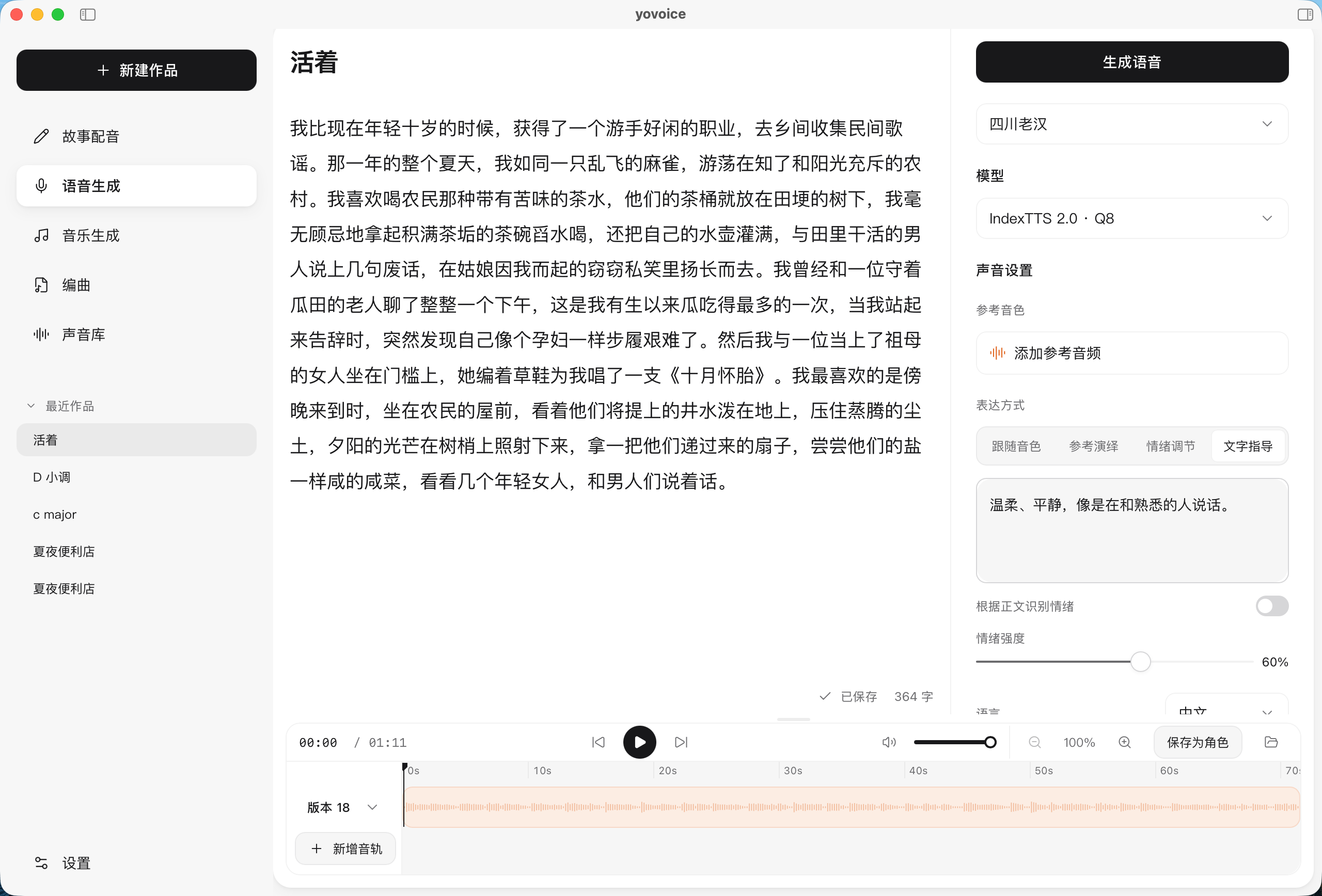
The open-source yovoice audio studio generates speech, cloned voices, songs, and MIDI projects locally. We examine its value, hardware demands, and licensing limits.
What this is about
yovoice is an open-source, locally operated studio for voice and music production. The desktop app combines text-to-speech, voice design, zero-shot voice cloning, song generation, and MIDI-based arrangements in one interface. According to the project page, version 0.4.0 is available for macOS, Windows, and Linux.
This is especially relevant to people who do not want to send manuscripts, reference voices, or unreleased music to a cloud service. Unlike a standalone speech model, yovoice provides a usable workflow with project management, take comparison, a timeline, and exports.
What yovoice actually does
The app downloads selected models to the user's computer and runs generation there. For speech, the project supports Kokoro, IndexTTS, VoxCPM2, and Qwen3-TTS, among others. For songs and instrumentals, its documentation lists ACE-Step 1.5 and YuE2. Users can synthesize text, design a voice from a description, clone a reference voice, or turn lyrics and style instructions into music.
For longer projects, there is line-by-line dubbing of text and subtitle files, multiple takes for comparison, waveform trimming, and audio, stem, and MIDI exports. A built-in assistant can use several model providers or Ollama to edit text and arrangements. yovoice also includes a command-line interface, an agent skill, an authenticated HTTP API, and an MCP service.
Local means the core audio generation can run without a cloud API. If users enable the optional assistant with an external model provider, the content entered there is still sent to that provider.
Why it matters
Voice data is particularly sensitive because a reference recording can carry biometric traits and a person's identity. A local workflow reduces the number of outside parties that receive raw material. It does not remove all risk: computers, backups, and exported files still need protection.
The bundle also matters to creators. Instead of configuring text-to-speech, a song model, MIDI tools, and editing software separately, yovoice ships installers and downloads models inside the app. The code's Apache-2.0 license supports inspection and adaptation. Model weights have separate terms, however; the project says OmniVoice, YuE2, and Breeze TTS 2 are limited to non-commercial use.
In plain language
Imagine a small audio kitchen. Previously, the narrator, mixing desk, composer, and notation tools lived in four different rooms. yovoice puts those worktops next to each other on the same computer. The ingredients stay in your kitchen, but every machine still has its own manual and usage license.
A practical example
A small education publisher wants to produce a twelve-minute lesson with three characters. It imports the script, assigns a voice to each line, and generates two versions of every section. The team reruns lines with poor emphasis, trims pauses in the waveform, and exports the finished tracks.
For an intro, the team also generates a short instrumental and exports separate stems for final editing. Because the manuscript and reference voices remain local, the publisher does not need to upload those files to a speech service. Before release, it still verifies each speaker's consent and the license of the selected model.
Scope and limits
First, speed depends heavily on the computer, model, and runtime. Large music and voice models need storage and may be slow on a CPU; the documentation therefore points users to different packages and hardware requirements.
Second, local does not automatically mean legally safe. Voices should only be cloned with permission, while model, training-data, and music rights may restrict commercial use. The app's Apache license does not extend to every model.
Third, yovoice is not a complete replacement for a professional audio workstation. Fine editing, mastering, pronunciation checks, and musical quality still require human review. The optional cloud assistant also weakens the privacy benefit whenever confidential content is sent to external APIs.
The sensible first test is a short, non-confidential text with a small model. Check installation size, generation time, pronunciation, export quality, and the exact model license before importing a larger project.
SEO & GEO keywords
yovoice, local AI audio studio, voice cloning, text-to-speech, AI music, MIDI, MCP, offline audio, open source, privacy
💡 In plain English
yovoice is a local studio for synthetic speech and music. It can narrate text, clone voices, and generate songs without sending the source material to a cloud for audio generation. Model licenses and consent still need checking.
Key Takeaways
- →yovoice combines speech synthesis, voice cloning, songs, and MIDI in a desktop app.
- →Audio generation can run fully locally on macOS, Windows, and Linux.
- →A CLI, HTTP API, MCP service, and agent skill support automated workflows.
- →The app's Apache-2.0 license does not automatically cover every bundled model.
- →Hardware needs, voice rights, and the optional cloud assistant require review before use.
FAQ
Can yovoice run without the internet?
Core audio generation can run locally after the app and models are installed. Downloads and external assistant models still require a connection.
Can I use cloned voices commercially?
Only with the necessary rights and an appropriate model license. The person's consent and each model's terms must be checked separately.
Which systems does yovoice support?
The project offers packages for macOS 14 or later on Apple Silicon, Windows 10 and 11, and x64 Linux.
Do I need a graphics card?
Not for every workflow, but large models benefit greatly from a GPU. A small model and short test script are the safest starting point.