
Feynman combines AI research with auditable research artifacts
September 19, 2026
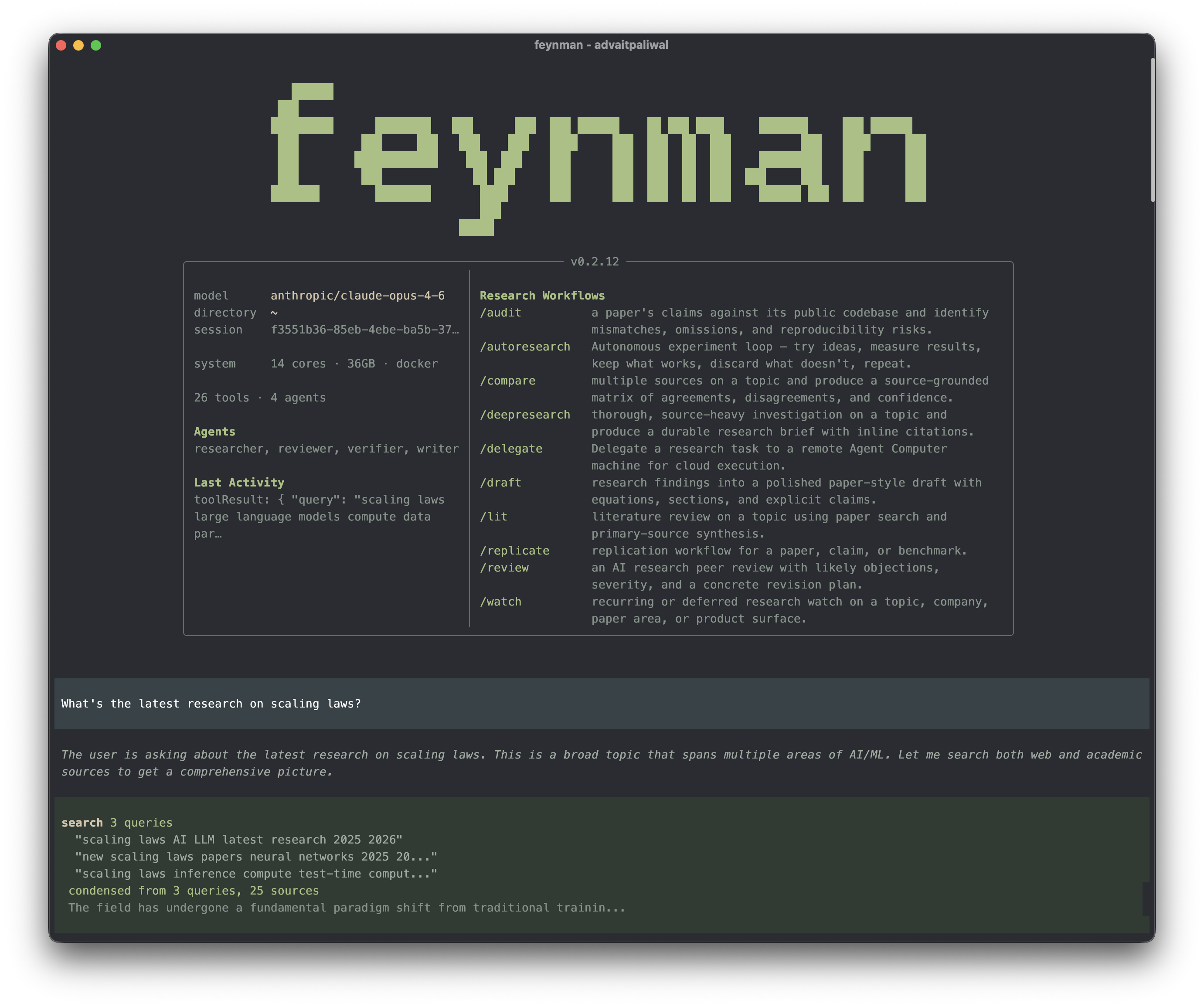
The open research agent Feynman combines literature search, source verification, replication plans, and a local workbench. It is practical, but still requires expert review.
What this is about
Feynman is an open-source research agent from Companion that does not stop scientific research at a chat answer. The tool searches academic literature and web sources, creates cited briefs, compares claims in papers with public code, and plans replication work. It runs in a terminal or as a local browser-based science workbench.
The product is mainly relevant to researchers, students, and technical teams that want to inspect results, sources, and intermediate steps together. Its official documentation describes installation on macOS, Linux, and Windows, plus a separate skills package for Codex, Claude, and OpenCode.
What Feynman actually does
The command-line tool accepts a research question and routes it according to the task. feynman lit creates a literature review with consensus, disagreements, and open questions. feynman rank orders papers using evidence about citations, methods, reproducibility, and provenance. feynman audit compares a paper’s claims with its publicly available code. feynman replicate drafts a replication plan; experiments are meant to run only after the user explicitly selects an execution environment.
Running feynman serve opens a local workbench for projects, chats, files, notebooks, artifacts, and provenance. For literature and scientific metadata, the project integrates sources including alphaXiv, OpenAlex, arXiv, PubMed, and Europe PMC. Local models can be connected through LM Studio, LiteLLM, Ollama, or vLLM, while hosted model providers are also supported.
Installation is available as a standalone runtime bundle or through npm. The standalone installer downloads a tagged release, verifies its SHA-256 checksum, and includes a compatible Node.js runtime. Users who only need the research workflows can install the skills separately.
Why it matters
General chatbots can produce a literature list, but the real work starts afterward: Which source supports which claim? Is the code public? Can a result be repeated under realistic conditions? Feynman attempts to combine these steps in an auditable workflow. Its value lies less in one answer than in the link between research, citations, artifacts, and history.
That matters for teams when a report must later be reviewed or continued. Instead of managing loose chat transcripts, PDFs, tables, and notebooks separately, the local workbench keeps these elements in one project context. This does not automatically reduce errors, but it can make mistakes and missing evidence easier to find.
Feynman is available under an open license on GitHub. The product page identifies Companion as the provider, while the repository and documentation show the installation path and supported research functions. The tool is therefore directly testable rather than merely announced on a landing page.
In plain language
Feynman is like a carefully organized travel folder. A normal chatbot may write a list of sights. Feynman also tries to store tickets, opening hours, maps, receipts, and changes so that another person can reconstruct the trip. The folder may still contain a wrong timetable, but the origin of the plan is more visible.
A practical example
A research team wants to test whether a training method reduces the error rate of a small language model. It first asks Feynman to collect 40 relevant papers and rank them by methodology, citation graph, and reproducibility. The team then selects five papers for full-text review.
Using the audit command, it compares one paper’s central claims with the accompanying repository. It then creates a replication plan for three training runs with the same dataset and a fixed compute budget. Results, configurations, tables, and a notebook remain in the same local workbench. Only the researchers decide whether to execute the proposed experiments in Docker, on their own hardware, or with a compute provider.
The sensible first test is smaller: install Feynman, ask one narrowly scoped question, and manually verify ten retrieved sources. The team should then check whether citations, versions, and conclusions actually match the originals.
Scope and limits
First, the quality of search results and synthesis depends on the selected model, reachable databases, and available full text. A neatly formatted source list does not prove that the interpretation is correct.
Second, a local workbench does not automatically provide complete data sovereignty. When users choose a hosted model provider or external search service, prompts are sent to those services. Sensitive research data should enter the workflow only after reviewing configuration, contracts, and logging.
Third, Feynman replaces neither peer review nor statistical and domain expertise. Automatically generated rankings can miss important niche work, and a replication plan can contain methodological errors. Model access, compute, and data costs also depend on the selected environment; no universal total price is stated.
SEO & GEO keywords
Feynman, Companion, AI research agent, Open Source AI, literature review, scientific research, PaperRank, reproducibility, local science workbench, research artifacts, alphaXiv, Codex Skills
💡 In plain English
Feynman is an open research agent for the terminal and a local browser workbench. It connects literature search, source checks, replication plans, and research files, but it does not replace expert review.
Key Takeaways
- →Feynman connects literature research, source verification, and research artifacts in one workflow.
- →The tool runs in a terminal or as a local browser workbench.
- →Both local and hosted model providers are supported.
- →Replication work is intended to start only after an execution environment is explicitly selected.
- →Sources and automatically generated conclusions still require expert review.
FAQ
Is Feynman open source?
Yes. Its repository is publicly available on GitHub and links to an open license.
Can Feynman use local models?
Yes. The documentation lists LM Studio, LiteLLM, Ollama, and vLLM as possible connections.
Does Feynman execute experiments automatically?
The tool can create replication plans. According to the project documentation, execution should start only after an environment is explicitly selected.
Does all data remain on the user's computer?
Not necessarily. The workbench runs locally, but hosted models and external search services receive the requests sent to them.