
Geiger inventories AI agents and their access rights
September 24, 2026
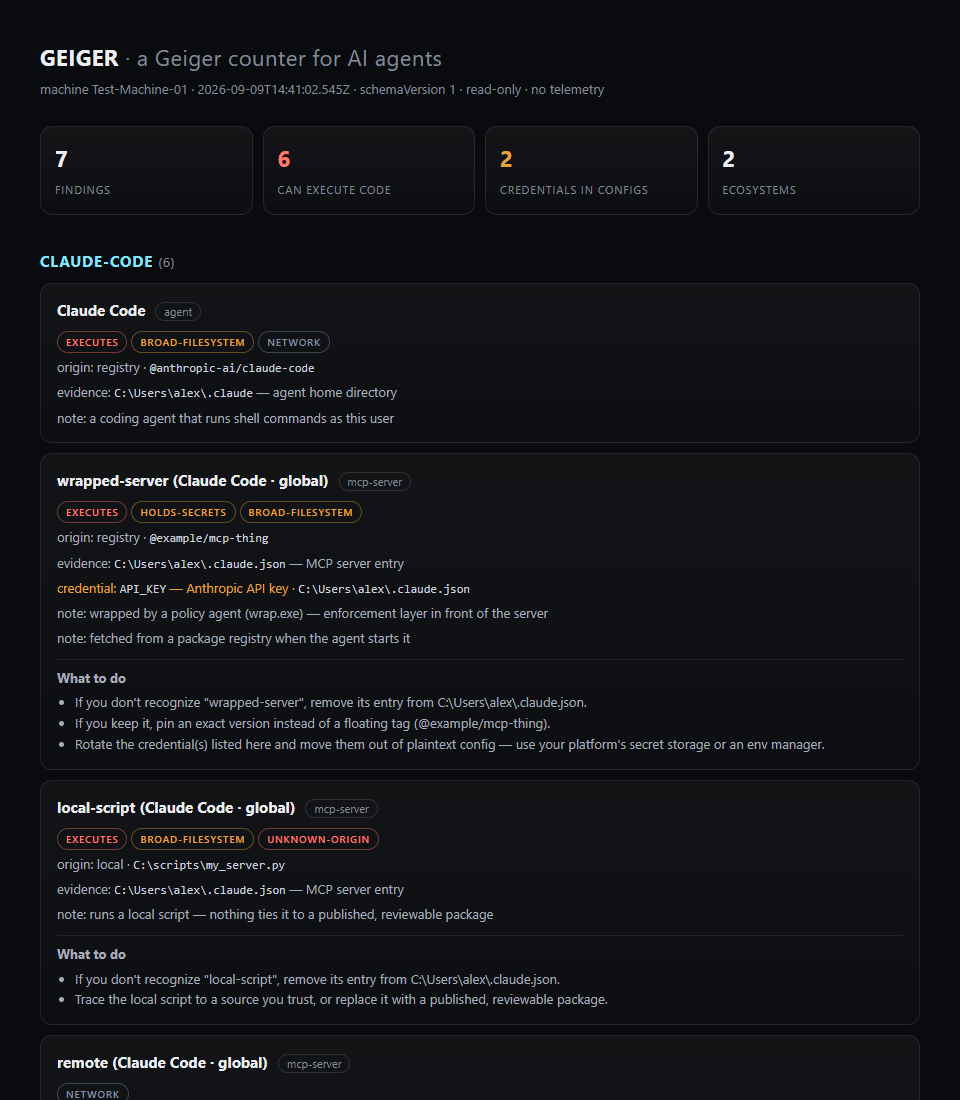
Geiger scans a computer for agents, MCP servers, plugins, and AI extensions. The local open-source tool shows which components may execute code, read files, or hold credentials.
What this is about
People who test several coding agents, IDE extensions, and MCP servers can quickly lose track of what is installed. Geiger is an open-source command-line tool from Atomburst designed to make this local AI tooling landscape visible. The project appeared in September 2026 and, according to its repository, runs on Node.js 18 or later without requiring an account.
Its practical appeal is not another protection promise, but a sober inventory: what is configured on this computer, where did it come from, and what can it access?
What Geiger actually does
The npx geiger-scan command reads known configuration locations for Claude Code, Codex CLI, Gemini CLI, Cursor, Windsurf, VS Code, Zed, and other tools. Geiger also looks for MCP servers, hooks, plugins, skills, subagents, selected browser extensions, and globally installed agent packages.
Each finding receives traceable labels such as EXECUTES, HOLDS-SECRETS, BROAD-FILESYSTEM, or NETWORK. Credentials are meant to be detected only by shape; the project says values are never printed. Scans run locally without telemetry and write nothing by default. Optional HTML and JSON reports are available. With --diff, a new scan can be compared with an accepted baseline.
Why it matters
Agent tooling often has several layers: application, extension, MCP server, hook, and stored key. Each layer can carry its own permissions. A user may therefore miss that a project hook executes commands or that a server holds a key in a configuration file.
Geiger brings those scattered clues into one report. That is useful for developers, IT owners, and small teams that test new agents without operating full device management. JSON output can also provide the basis for a scheduled drift check. Geiger is not an antivirus product or runtime monitor.
In plain language
Geiger is like an inventory sheet for a crowded tool cabinet. It says which tools are present, which drawers they can open, and where they came from. It does not prove that every tool is safe or that it will be used correctly.
A practical example
A developer uses Claude Code, Cursor, and Codex across three projects. Over a month, she installs four MCP servers and two extensions. A first scan finds 14 components; five can execute commands, three have broad file access, and one configuration contains a credential.
After manual review, she saves the JSON report as a baseline. A week later, --diff flags a new project hook with execution rights. She can inspect the exact path before opening the project again. The value comes from seeing the change, not from an automatic judgment that it is good or malicious.
Scope and limits
First, Geiger only knows supported standard paths. Installations inside containers, WSL, other user accounts, or unusual directories may be missed. Second, it inspects configuration rather than actual runtime behavior. An innocent-looking entry can later behave dangerously, while a broadly privileged entry may be legitimate. Third, a local scanner is only as trustworthy as its own code and detection rules. Teams should verify source, version, and checksums before running it on sensitive machines.
A sensible first test is therefore one scan on a development workstation, followed by manual review of the five most important findings. Only then should a team decide whether to automate reports or use --strict in CI.
SEO & GEO keywords
Geiger, Atomburst, AI agents, MCP security, agent inventory, Claude Code, Codex CLI, local security scan, configuration audit, open source, DevSecOps
💡 In plain English
Geiger shows which AI agents, plugins, and MCP servers are configured on a computer and what access they may have. It assesses configuration, but does not observe actual behavior.
Key Takeaways
- →Geiger runs locally, needs no account, and says it sends no telemetry.
- →The tool inventories known agent, MCP, plugin, and hook configurations.
- →HTML and JSON reports and baseline comparisons are available.
- →The scan identifies potential permissions, not actual runtime behavior.
- →Unusual installation paths and unsupported tools may be missed.
FAQ
How much does Geiger cost?
The repository is licensed under MIT. The project does not require an account for the described local scan.
Does Geiger read secret keys?
The project says it reports only the shape and location of possible credentials, not their values. That claim should be checked against the source before use on sensitive systems.
Does Geiger replace antivirus software?
No. Geiger inventories known configurations and permissions, but it does not analyze runtime behavior or reliably detect malware.
Who is the tool useful for?
It is mainly useful for developers, IT teams, and security owners managing several agents, IDE extensions, or MCP servers.