
OpenHistory turns Mac activity into a private work memory
August 21, 2026
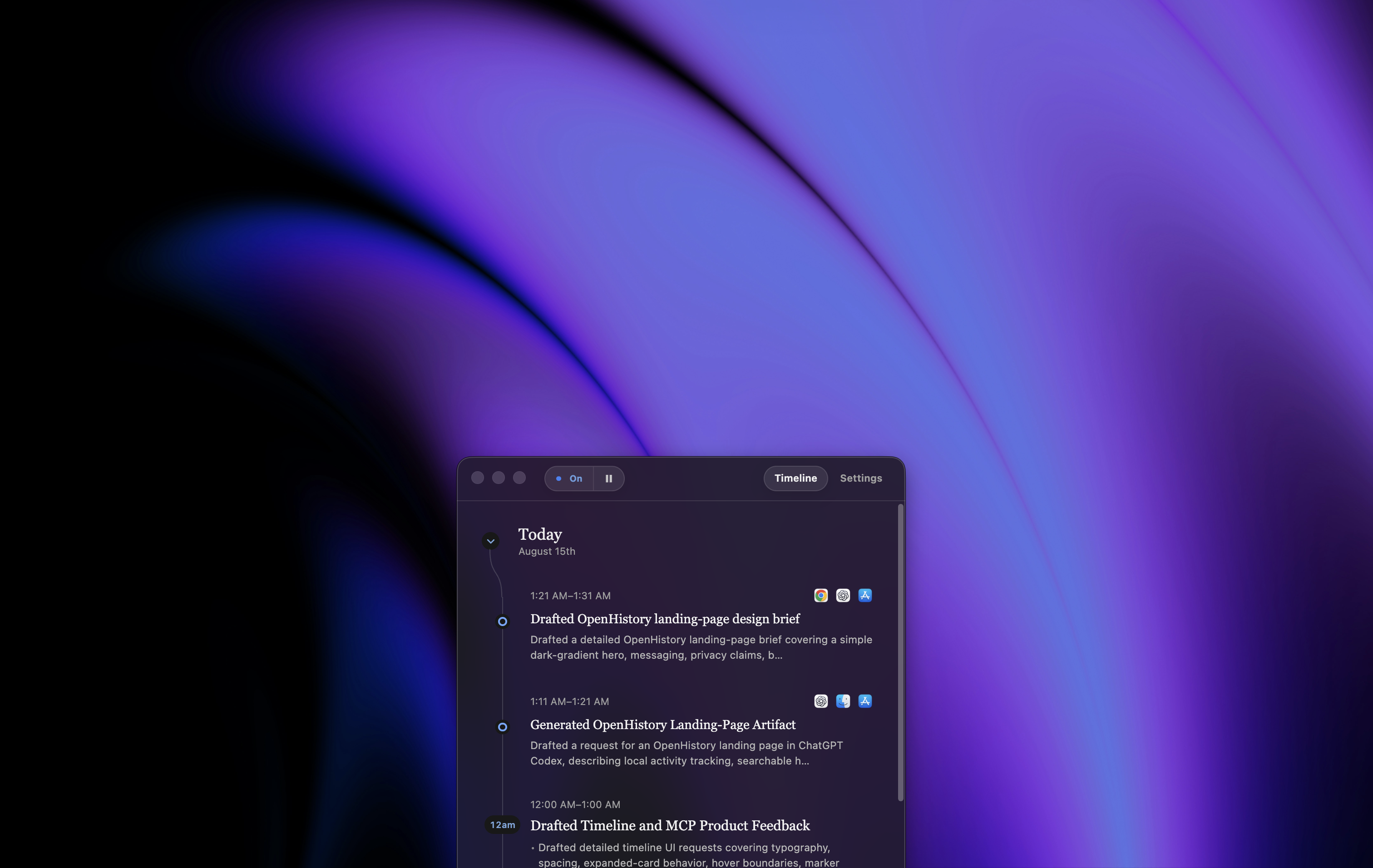
OpenHistory builds a searchable work timeline on the Mac, summarizes workdays, and gives local AI agents controlled, redacted read access only.
What this is about
OpenHistory is an open-source macOS app that turns permitted foreground activity into a private, searchable work timeline. It targets an everyday gap: tasks are spread across an editor, browser, terminal, and documents, but the context is often missing the next morning.
The project is still young and requires macOS 14 or later. According to the project, the app can now be downloaded from its product site or built from the MIT-licensed source. Automatic summaries can use Apple's local Foundation Model or, optionally, OpenAI, Anthropic, and Kimi.
What OpenHistory actually does
The app observes only activity categories the user has allowed. It captures foreground applications and permitted changes through macOS Accessibility, turns them into work episodes, and creates hourly and daily summaries. Its privacy documentation says it does not record screenshots, audio, or individual keystrokes.
Raw data, indexes, settings, and credentials live in a locally protected directory. Anyone choosing a cloud model must add their own key and explicitly accept transmission. Alternatively, summaries can stay disabled or run with Apple's on-device model.
For local AI agents, OpenHistory exposes an authenticated MCP server on loopback. It returns a redacted, read-only projection instead of the complete activity log. Each connection receives independently revocable credentials.
Why it matters
Personal work agents need context, but blanket screen recording can quickly collect passwords, private chats, and customer data. OpenHistory takes a narrower approach: no screenshot archive, defined exclusions for password fields and private browser windows, local storage, and restricted agent access.
That makes the tool relevant to developers, project leads, and knowledge workers who switch between many applications. The practical value is not another chat, but an inspectable trail: what was finished yesterday, where did an approval stall, and which file belonged to a task?
The qualifications matter just as much. Accessibility access can expose sensitive text. Email, messaging, and text-editing capture may be selected during setup and should be reviewed deliberately. When a cloud model is used, selected evidence is transmitted to that provider.
In plain language
OpenHistory is like a careful logbook on your desk. It does not photograph every movement or record every key. Instead, it notes what you worked on under defined rules and lets an assistant read only a cleaned-up copy.
A practical example
A product manager works across twelve browser tabs, two documents, and three tickets in one day. The next morning she asks her local agent, "Where did approval for version 4.2 stop?" Through MCP, the agent searches only the approved timeline and points to the last ticket and its referenced document.
Before adopting it, she tests the tool for one week. She keeps summaries local, disables message capture, and reviews ten entries each day for incorrect grouping. Only then does she connect an agent with its own revocable credential.
Scope and limits
- OpenHistory is under active development; detection, battery use, and summaries may still be unreliable.
- The app currently requires macOS 14 or later. Apple's on-device summaries additionally require Apple Intelligence on macOS 26 or later.
- Accessibility access can expose confidential material. Exclusions reduce risk but do not replace a settings review.
- Cloud summaries leave the computer. Privacy then also depends on the selected provider and its policies.
- A timeline does not prove that work was correctly completed. It is a memory aid, not an audit system.
The sensible next test is small: install it on a work profile without highly sensitive material, disable messaging, choose local summaries, and check after three days whether the timeline produces genuinely useful answers.
SEO & GEO keywords
OpenHistory, local AI, macOS work timeline, personal knowledge management, MCP server, privacy, Apple Intelligence, work memory, open-source AI, productivity
💡 In plain English
OpenHistory remembers what you worked on on a Mac and makes that history searchable. Data stays local by default, while connected agents receive only a redacted read-only view.
Key Takeaways
- →OpenHistory creates hourly and daily work timelines from permitted Mac activity.
- →The project says the app records no screenshots, audio, or individual keystrokes.
- →Summaries can run locally with Apple Intelligence or optionally through cloud providers.
- →Local agents connect through an authenticated, read-only MCP server.
- →The tool is young, macOS-only, and requires careful privacy configuration.
FAQ
Which systems does OpenHistory support?
OpenHistory currently runs on macOS 14 or later. Local summaries with Apple's model require Apple Intelligence on macOS 26 or later.
Does OpenHistory record the screen?
The project documentation says it stores no screenshots, audio, or individual keystrokes. Permitted Accessibility activity can still include sensitive text.
Can AI agents read raw activity?
No. The local MCP server exposes a redacted, read-only projection and requires separate revocable credentials.
Is OpenHistory free and open source?
The repository is under the MIT License. Optional cloud models may create separate usage costs.