
ThinkWatch Lite controls the data paths of coding agents
October 4, 2026
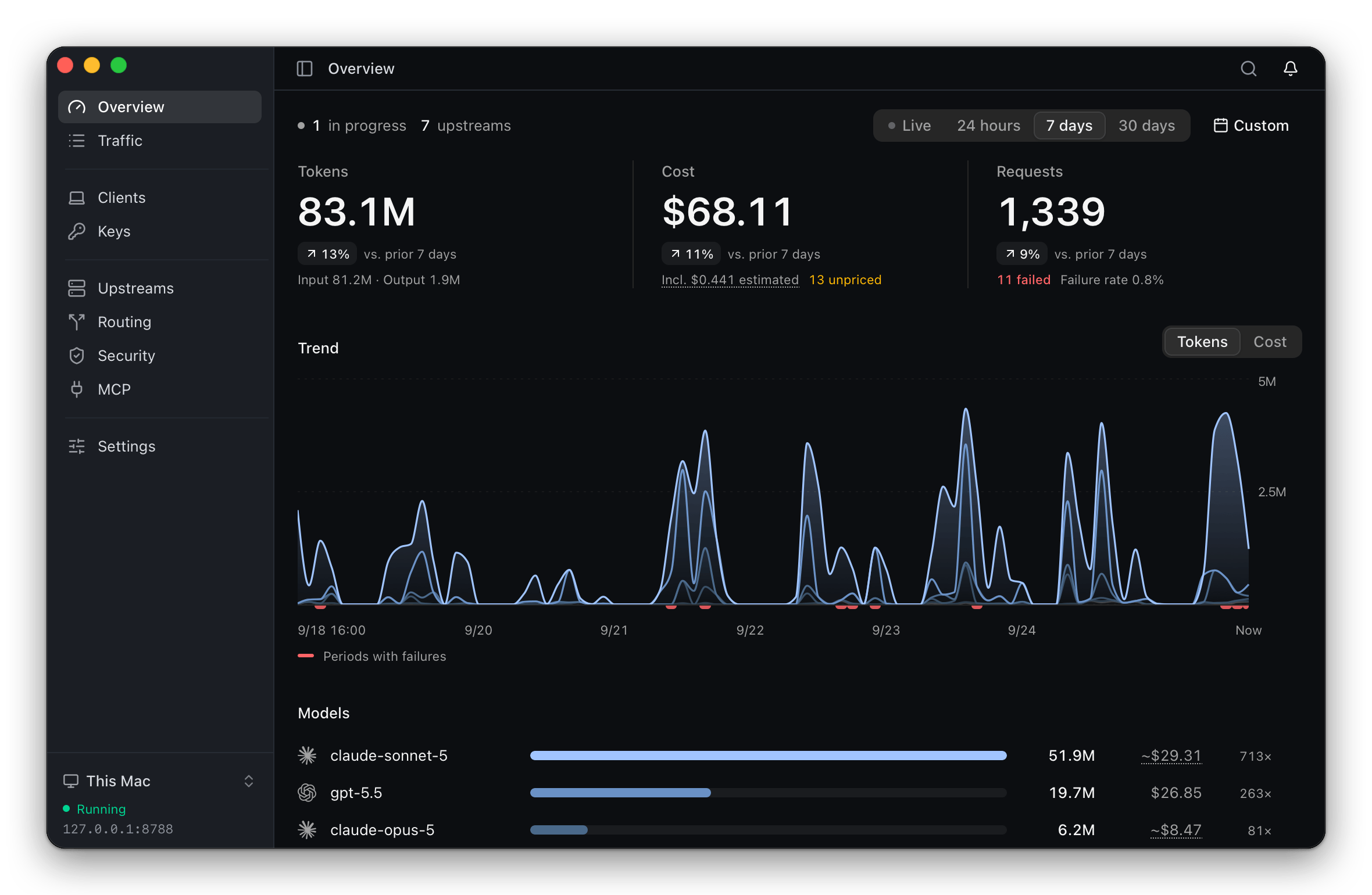
ThinkWatch Lite runs locally between a coding agent and its model provider. The open-source tool logs costs, switches endpoints, and can intercept secrets or risky tool calls.
What this is about
ThinkWatch Lite is a local gateway for coding agents and other AI clients. Instead of connecting Claude Code, Codex, or Aider directly to a model provider or relay, traffic first passes through the app. Users can switch providers, record requests, and apply protection rules there. The project was created on September 12, 2026, and version 2026.10.4 was released on October 4, 2026. Its source code uses the MIT license.
This is particularly relevant for teams testing multiple providers or using third-party relays. A relay normally sees the full prompt and response. ThinkWatch Lite says it can replace sensitive strings before transmission and stop suspicious tool calls contained in responses.
What ThinkWatch Lite actually does
The app connects supported clients to a local service once. Users then decide in the gateway which upstream and model receives a request. Rules can route by model, image use, tools, or extended thinking. If an upstream fails before the response starts, the gateway can move to the next provider.
For every request, the interface records the route, tokens, estimated cost, and failures. According to the project documentation, its protection layer detects items including API keys, private keys, JWTs, and passwords in connection strings. It can replace those values with placeholders. Another inspection looks for tool calls in responses that download and execute code, transmit environment variables, or install startup entries. The default Observe mode only records findings; blocking must be enabled deliberately.
ThinkWatch Lite also presents configured MCP servers, skills, hooks, and project instructions from several clients side by side. A scan looks for invisible characters, prompt injection, dangerous commands, and overly broad permissions. The core can run locally or on a Linux server, while the desktop app supports macOS, Windows, and Linux.
Why it matters
Coding agents are often allowed to read files, run commands, and make network requests. That makes the path of each request important, not just model quality. OWASP lists prompt injection as a major risk for applications built with large language models. A local control point can centralize protection rules and auditable records instead of configuring every client independently.
The value is clearest when a team mixes relays, local models, and direct providers. Cost comparisons, failover, and redaction then live in one interface. However, this does not replace provider review or least-privilege permissions on the computer. The NIST AI Risk Management Framework recommends measuring and managing risk across the lifecycle. A gateway can supply technical evidence for that process, but it is not complete governance.
In plain language
ThinkWatch Lite resembles the security desk at the entrance to an office building. Visitors are not rejected automatically, but their destination is checked, sensitive items can be held back, and suspicious activity is recorded. The desk does not make the building invulnerable, but it creates one shared checkpoint.
A practical example
A development team uses Codex directly, Claude Code through a relay, and a local model for small helper requests. During one workday, 1,200 model requests pass through the gateway. A rule sends simple title generation to the local model while code analysis remains with the selected cloud provider.
Redaction detects an API key accidentally pasted into two prompts and replaces it before transmission. Later, a response contains a tool call that wants to download and immediately run a file. Observe mode first creates only a warning. After a controlled test, the team enables the blocking rule. Human review remains essential: a legitimate installation script can resemble an attack.
Scope and limits
First, a gateway is another privileged component. Anyone routing all requests and keys through it must secure updates, local access rights, and log retention. Second, redaction and tool inspection depend on detection patterns. Unknown secret formats may pass through, while harmless commands may be blocked. Third, the project says the app is not signed by Apple or Microsoft, so first-time installation requires extra steps.
A cost dashboard should not be treated as an exact invoice either: ThinkWatch explicitly labels estimates and requests without a known price. A sensible trial starts with one client, synthetic secrets, and Observe mode. Blocking should be enabled only after the team has reviewed the resulting findings.
SEO & GEO keywords
ThinkWatch Lite, coding agent gateway, Claude Code, Codex, prompt injection, API key redaction, MCP security, model routing, local AI security, open-source developer tools
💡 In plain English
ThinkWatch Lite is a local checkpoint for coding-agent requests. It can switch providers, expose costs, and inspect suspicious data or tool calls before they cause harm.
Key Takeaways
- →ThinkWatch Lite runs locally between an AI client and a model provider or relay.
- →The tool supports routing, failover, cost records, and tool-call inspection.
- →Redaction can replace recognized key and password patterns before transmission.
- →Observe mode supports a cautious rollout without immediate blocking.
- →Detection patterns and local logs still require human review and protection.
FAQ
Is ThinkWatch Lite free to use?
The source code is available under the MIT license. Model-provider, relay, and infrastructure costs still apply.
Which operating systems does the app support?
The project page lists macOS, Windows, and Linux. Installation methods differ by platform.
Does the tool prevent every prompt injection?
No. Its checks reduce specific risks but can miss unknown attacks or flag harmless content.
How should a team start?
Begin with one client, synthetic secrets, and Observe mode. Enable blocking only after reviewing the findings.