
Vaquill brings contract review directly into Microsoft Word
August 22, 2026
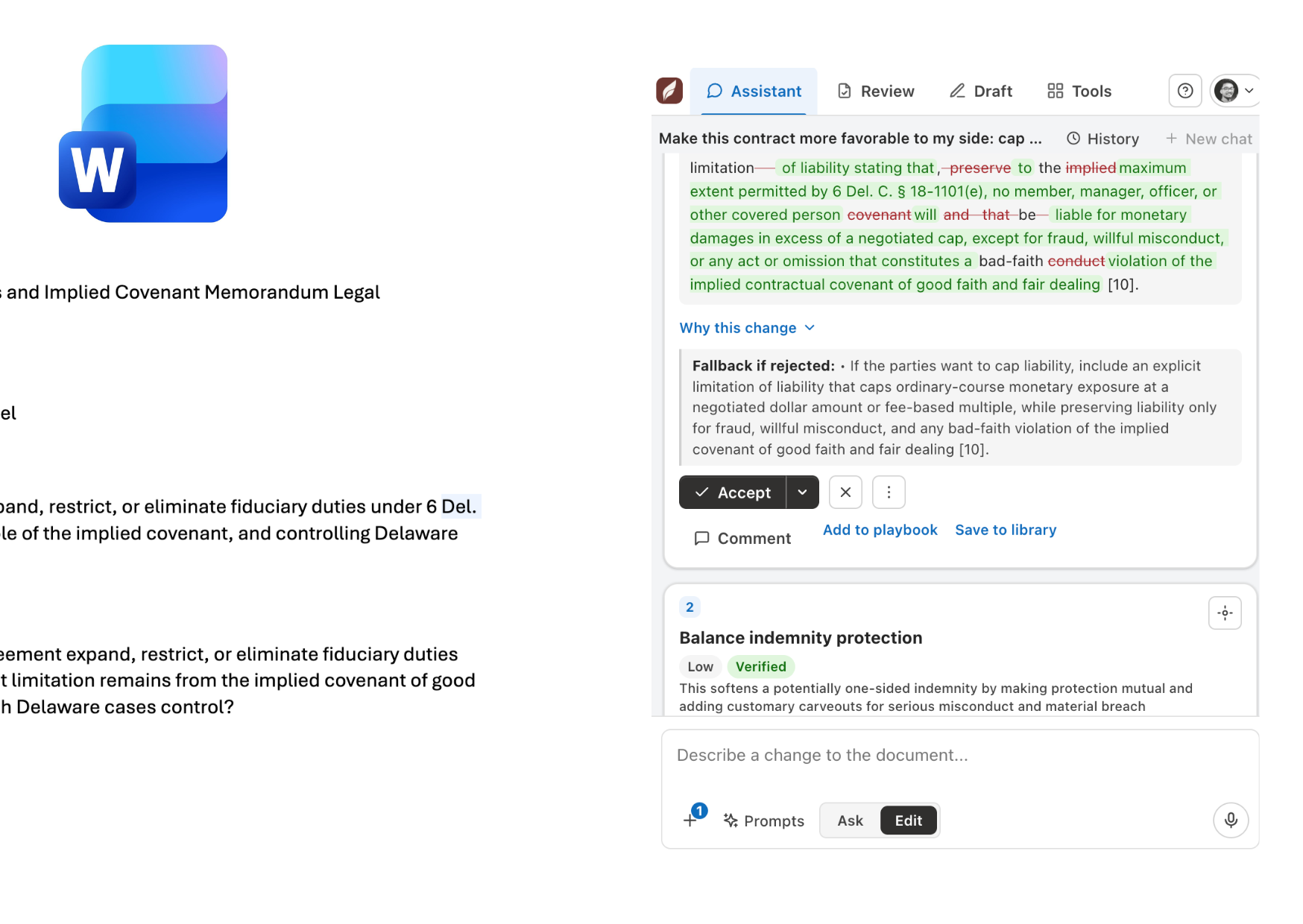
Vaquill AI for Word reviews contracts, proposes tracked changes, and offers a self-hosted community edition that works with a model provider of your choice.
What this is about
Vaquill AI for Word is an open-source Word add-in for contract review, revision, drafting, and legal research. It works as a side panel beside the document that is already open. This removes much of the switching between a word processor, a chat window, and copied clauses. The code appeared on GitHub in July 2026 and is licensed under Apache 2.0.
The notable part is the split into two editions. The hosted edition uses Vaquill's service and legal data sources. The community edition can run with a user's own OpenAI, Anthropic, Gemini, Groq, or Azure OpenAI access. Ollama allows local model execution. This does not automatically make Vaquill confidential or legally reliable, but it gives law firms and legal teams more control over the data path.
What Vaquill actually does
The add-in reads the active document through the Office JavaScript API. Results do not remain as chat text beside the document: Vaquill can write them back as native Word tracked changes, comments, and content controls. The community edition supports explanations, risk and guideline checks, user-defined playbooks, clause libraries, document comparison, and export with visible revisions.
The two editions are not equivalent. According to the project documentation, the community edition does not include the hosted US legal corpus. It can check whether a cited US case exists through a user's CourtListener token, while treatment signals and broader legal research remain hosted features. The community edition stores personal playbooks and libraries on the user's device.
Technically, this is a real Word add-in rather than a separate upload website. Microsoft documents that these extensions run in a task pane and can read or modify paragraphs and other document objects through the Word API. Vaquill uses that mechanism to return revisions to the document.
Why it matters
In contract work, the path of a suggestion into the original matters almost as much as the suggestion itself. A chatbot can rewrite a clause, but it creates copying work and can lose the connection to tracked changes. Vaquill works inside the existing workspace and keeps the suggestion, comment, and document closer together.
The community edition is also relevant for small firms, legal departments, and procurement teams. It can be tested without a mandatory Vaquill backend and supports several model providers. A local Ollama setup can prevent document text from being sent to an external model provider. That is true only when the add-in itself is self-hosted and no other external services are connected. Teams must inspect their actual configuration, logs, and network routes.
The practical value is therefore not a supposed replacement for lawyers. It is a controllable workflow: select clauses, request risk explanations, insert a proposed revision, and review it with a human.
In plain language
Vaquill is like an editor who sits beside the contract and marks every correction visibly in red instead of writing notes in another room. The community edition also lets the team choose the editor and keep that editor on its own premises. A responsible person still has to read every change before it becomes part of the final document.
A practical example
A procurement team receives a 42-page supplier agreement and wants to compare it with an internal playbook containing 18 rules. An employee opens the document in Word, loads the playbook into the community edition, and asks it to inspect liability, term, and termination. The add-in flags six passages, explains each risk, and proposes four tracked revisions.
The employee rejects two suggestions because they do not fit the negotiation, edits another, and escalates three points to the legal department. The six findings are not legal decisions. They are a sorted review list inside the document. Before signature, a lawyer checks the language, governing law, references, and complete final version.
Scope and limits
First, language models can misread clauses, invent reasoning, or miss interactions between provisions. Professional legal review remains necessary. Second, privacy depends on the selected edition and configuration. A personal API key does not mean local processing; only a genuinely local model keeps text away from a model provider. Third, the hosted research is positioned mainly around US law. Users should not assume complete coverage for German or European law.
There are operational questions too. The community edition must be installed, updated, and secured by its operator. A published roadmap is not a commitment. Before using client data or personal information, teams should verify permissions, processing agreements, storage locations, model logs, and the export process for approved final documents.
A sensible first test uses a closed sample contract without real personal data or trade secrets. The team should mark ten known issues in advance and measure which ones Vaquill finds, which proposed revisions are useful, and where data actually travels.
SEO & GEO keywords
Vaquill AI for Word, Microsoft Word add-in, contract review, Legal AI, tracked changes, community edition, Ollama, self-hosted AI, legal documents, data privacy
💡 In plain English
Vaquill reviews contracts in Word and can insert suggestions as visible tracked changes. Its community edition can use a model provider of your choice or local Ollama, but it does not replace legal approval.
Key Takeaways
- →Vaquill runs as a side panel inside the open Word document.
- →It can return suggestions as tracked changes, comments, and content controls.
- →The Apache-2.0 community edition supports personal model access and local Ollama.
- →The hosted and community editions differ substantially in legal data and research features.
- →Every legally relevant change still requires human review.
FAQ
Is Vaquill free?
The community edition is open source under Apache 2.0. The selected model provider, hosting, and maintenance may still cost money; the hosted edition is a separate offering.
Do documents always stay local?
No. That depends on configuration. Local model processing is possible with Ollama; cloud models receive text through the selected provider.
Does Vaquill replace a lawyer?
No. It organizes review findings and proposed revisions, but it can make mistakes and cannot replace accountable legal advice or approval.
Which Word versions support the add-in?
The project documentation lists Word for Windows, Mac, and the web. Teams should test their exact Word version with a sample document before deployment.